|
游客,本帖隐藏的内容需要积分高于 1 才可浏览,您当前积分为 0
资源信息:
中文名: CD/DVD映像文件处理工具
英文名: Power Software PowerISO
资源格式: 压缩包
版本: v5.3 Portable
发行时间: 2012年
制作发行: Power Software Ltd.
语言: 英文
概述:
软件类型:应用软件>虚拟光驱
软件性质:免费破解软件
操作系统:Windows
应用平台:Windows 98 / Window Me / Windows 2000 / Windows XP / Windows 2003 / Windows Vista / Windows 7 operating system or above.
问题反馈: support@poweriso.com
网站链接: http://www.poweriso.com/
软件介绍:
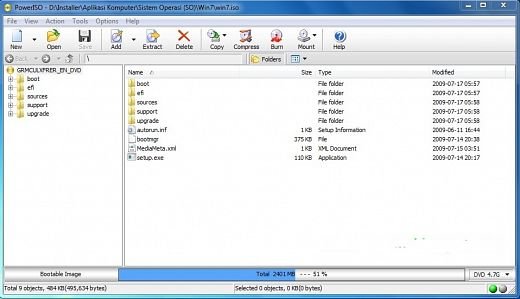
PowerISO是一款强大的CD/DVD映像文件处理工具。它可以创建,编辑,解压,转换,压缩,加密和分割ISO/BIN映像文件。内建虚拟光驱可以加载映像文件实时运行。最重要的是,压缩的文件可以在不解压的情况下直接使用。PowerISO使用方便,支持Shell集成,剪贴板和拖放操作。PowerISO支持ISO、BIN、NRG、 IMG、DAA等几乎所有常见的映像文件。
虚拟光驱软件,可以说它是刻录软件,也可以说它是一个映像文件处理软件。
因为PowerISO包含以上提到的所有功能,甚至可以说它涵盖了CD/DVD映像处理的各个方面。它支持打开,提取,创建,编辑,压缩,加密,分割和转换ISO镜像文件,并支持以虚拟光驱的形式读取它们。
特 点:
支持几乎所有的CD / DVD – ROM映像文件格式;支持32位和64位Windows 7;
从硬盘中的文件或CD / DVD – ROM中打开、提取、创建、加密ISO文件;编辑,转换现有的ISO文件;
支持制作可启动的ISO映像文件,优化、压缩映像文件以节省磁盘空间;支持直接刻录映像文件;
支持创建多达23个虚拟光驱;可集成到资源管理器方便地使用上下文菜单,拖放,剪贴板复制粘贴进行操作。
Main Features:
Support almost all CD / DVD / BD-ROM image file formats (ISO, BIN, NRG, CDI, DAA and so on).
What is DAA file? DAA file (Direct-Access-Archive) is an advanced format for image file, which supports some advanced features, such as compression, password protection, and splitting to multiple volumes.
Open and extract ISO file. You can extract ISO file with a single click.
Burn ISO file to CD, DVD, or Blu-Ray disc. PowerISO is a professional burning software. With this tool, you can create Audio CD, Data CD, Data DVD, Video DVD or VCD. PowerISO also supports Blu-Ray burning.
Burn Audio CD from MP3, FLAC, APE, WMA, or BIN files.
Rip Audio CD to MP3, FLAC, APE, WMA, or BIN files.
Create ISO file or BIN file from hard disk files or CD / DVD / BD discs.
Edit ISO image file directly.
Mount ISO file with internal virtual drive. PowerISO can mount all popular disc image files to built-in virtual drive.
Convert image files between ISO / BIN and other formats. PowerISO can not only convert BIN to ISO, but also convert almost all image file formats to standard ISO image file.
Create bootable USB drive. PowerISO allows you to setup Windows through USB drive.
Make bootable ISO file and create bootable CD, DVD disc.
Support both 32-bit and 64-bit Windows.
Can be used easily. PowerISO supports shell integration, context menu, drag and drop, clipboard copy paste...
System requirement:
Windows 98 / Window Me / Windows 2000 / Windows XP / Windows 2003 / Windows Vista / Windows 7 operating system or above.
Intel Pentium 166MHz or above.
64MB memory.
At least 10MB hard disk space.
代码
PowerISO is a powerful CD / DVD / BD image file processing tool, which allows you to open, extract, burn, create, edit, compress, encrypt, split and convert ISO files, and mount ISO files with internal virtual drive. It can process almost all CD / DVD / BD image files including ISO and BIN files. PowerISO provides an all-in-one solution. You can do every thing with your ISO files and disc image files.
|



 发表于 2021-8-16 22:25:29
/thumb.jpg)