|
游客,本帖隐藏的内容需要积分高于 1 才可浏览,您当前积分为 0
资源信息:
中文名: 蓝光光碟备份软件
英文名: OpenCloner Blue-Cloner
资源格式: 压缩包
版本: v3.40
发行时间: 2012年
制作发行: OpenCloner Inc.
语言: 英文
概述:
软件类型:软件>多媒体类
软件性质:破解软件
操作系统:Windows
应用平台:Windows Vista, XP, 7
问题反馈:http://www.opencloner.com/support.html
网站链接:http://www.opencloner.com/blue-cloner.html
软件介绍:
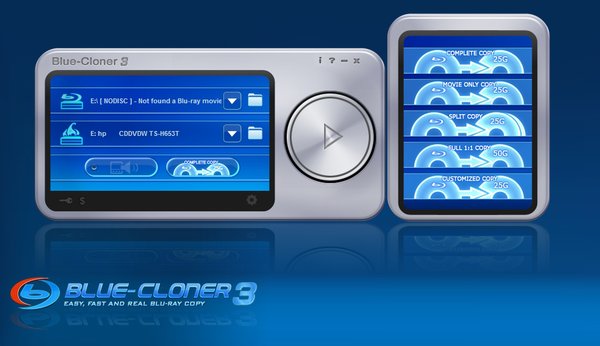
Blue-Cloner 是款专业,但却易于使用的蓝光光碟备份软体。透过它,我们可以很轻易松且容易地将蓝光光碟备份至我们的电脑硬碟,或着是蓝光光碟,且还能保有其优异的画质。
Blue-Cloner 3 is a one-click Blu-ray tool to make perfect Blu-ray copy easily with its all-round improvements. It can copy Blu-ray movies to BD-R/REs or to the hard disk and burn the ISO files from the hard disk to Blu-ray discs with absolutely the same quality. The brand-new customized copy mode enables you to make Blu-ray backups according to your preferences.
The latest encoding technology for GPU, including NVIDIA and ATI video cards, makes H.264 encoding much faster than before. Blue-Cloner 3 also enables you to make various customized settings, such as the selection of the audio track and subtitle, the conversion of the HD audio, and many more. Have a short rest and then the Blu-ray copy will be finished!
Program Features:
- Perfect 1:1 Blu-ray copy
- The brand-new customized copy mode enables you to make Blu-ray backups according to your preferences such as selecting a chapter to copy.
- Movie only copy - removes unwanted movie features, including subtitles and prohibition messages.
- Removes encryptions of BD+ and AACS from Blu-ray discs with a third-party helper such as Blu-ray Copy Helper.
- Compatible with full Blu-ray support, including the decryption and burn of Blu-ray discs.
- Burns ISO files from the hard disk to Blu-ray discs.
- Copies the Blu-ray movies to ISO files.
- Previews the source Blu-ray movie under the customized copy mode.
- Splits one Blu-ray movie to two blank BD-Rs (25G).
- Supports for the decoding function for ATI video cards.
- Supports for the encoding and decoding function for NVIDIA video cards to speed up the Blu-ray copy.
- Greatly increases the copy speed.
- The optimized H.264 encoding format makes Blu-ray copy more than twice faster than before.
- Select whether to keep menus when splitting a Blu-ray movie.
- Plays back the copied Blu-ray movies on your standalone Blu-ray disc player, on Sony PS3 or on the PC with Blu-ray player software.
- Adjusts the compression rate of the special features to save more space of your hard disk or BD-R/REs.
- Automatically selects the reader and burner after the source Blu-ray disc is inserted into the drive.
- Sets the size of the target Blu-ray disc.
- Shuts down the system when the copy is finished.
Blue-Cloner requires the system to be configured with the following equipments:
Minimum configuration:
Pentium-IV 1.0 GHz
512MB of RAM
50 GB free hard disk space (NTFS partition)
Windows XP
A Blu-ray disc drive
Recommended configuration:
Intel Core2 1.86GHz or a faster processor
2048MB of RAM
50 GB free hard disk space (NTFS partition)
A Blu-ray burner
Windows Vista, XP, 7
A Blu-ray disc drive
An NVIDIA video card or an ATI video card
代码
Blue-Cloner 3 is powerful Blu-ray copy software to make quality Blu-ray backups easily. It can copy Blu-ray movies to BD-R/REs or to the hard disk with no quality loss. Blue-Cloner 3 allows you to make Blu-ray copies according to your different needs and preview the source Blu-ray movie through the customized copy mode. The decoding function for ATI and NVIDIA video cards is supported and the copying speed has been improved greatly. The comprehensive functions and user-friendly interface makes Blu-ray copy much easier than before.
Perfect 1:1 Blu-ray copy – makes a copy of the whole Blu-ray disc onto another one.
HST™ - The built-in HST™ of Blue-Cloner 3 will make the Blu-ray copy much faster than before.
Movie-only copy – copies the main movie of the original Blu-ray disc to a blank BD-R (25G), omitting unwanted features.
Compresses a Blu-ray disc (50G) to a blank BD-R (25G), including menus and special features.
Completely copies a full BD-R (25G) onto another one with almost the same quality.
Splits one Blu-ray disc to two blank BD-Rs (25G).
Customized copy – copies Blu-ray movies according to your needs such as selecting a chapter to copy, selecting the audio track and subtitle, etc.
Decrypts the Blu-ray discs with protections such as BD+ and AACS.
Greatly improved the copying speed.
Burns the existing Blu-ray folder or ISO file to the Blu-ray disc.
Copies Blu-ray movies to ISO files.
Preview the source Blu-ray movie before copying.
Supports for the encoding and decoding function for NVIDIA and ATI video cards.
Supports for the decoding function for ATI video cards to decode high-definition videos.
Selects the encoding format (MPEG2 or H.264).
Backs up Blu-ray movies to the hard disk.
Plays back the copied Blu-ray discs on the PC with Blu-ray player software.
User-friendly interfaces make the Blu-ray copying simple.
| 

 发表于 2021-8-16 22:25:31
/thumb.jpg)

/thumb.jpg)
/thumb.jpg)

