|
游客,本帖隐藏的内容需要积分高于 1 才可浏览,您当前积分为 0
资源信息:
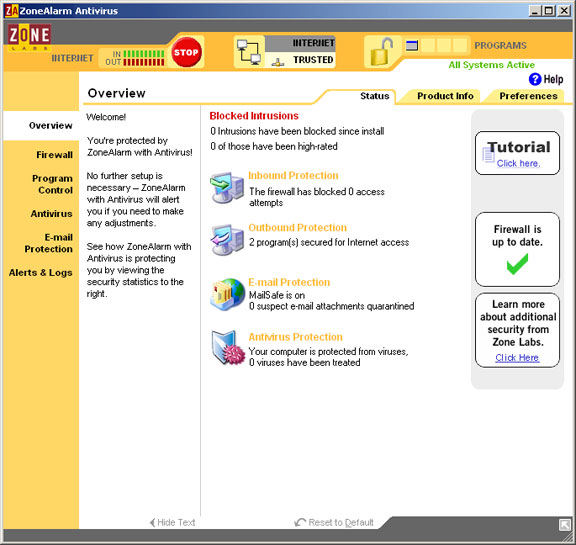
中文名: ZoneAlarm 反病毒软件
英文名: ZoneAlarm® Antivirus 2009
别名: ZA AV
资源格式: 压缩包
版本: V9.0.011.000 EN
发行时间: 2009年
制作发行: Check Point Software Technologies Ltd.
地区: 美国,以色列
语言: 英文
概述:
官方网站 http://www.zonealarm.com/security/en-us/zo...ware.htm
ZoneAlarm (俗称 ZA)是由以色列 CheckPoint 公司下属的 Zone Labs 出品的一个世界级的计算机安全产品系列.其供家庭/个人用户使用.拥有ZoneAlarm的CheckPoint公司也是世界上开发企业级防火墙产品的领袖.
ZoneAlarm Anti-Virus (简称:ZA AV) : ZoneAlarm系列中的反病毒产品. 使用卡巴斯基的AVP引擎.该版本带有防火墙, 相当于一个精简了的安全套装.
ZoneAlarm® Antivirus 2009
Award Winning Antivirus PLUS #1 Firewall
Only ZoneAlarm Antivirus includes both award-winning antivirus PLUS the world's #1 Firewall. We prevent attacks before they start.
Award-winning Antivirus
We don't just scan and remove viruses, we prevent and disable even the most recent and sophisticated viruses and computer attacks that the others miss.
Includes the World's #1 Firewall From the People Who Invented It.
ZoneAlarm pioneered the personal computer firewall used by over 60 million people worldwide, and our parent company, Check Point Software, invented the enterprise firewall used by every member of the Fortune 100. We know how to keep the bad guys out.
Keeps YOU in Control of Your Computer
Rootkits and operating system attacks can by-pass other defenses and take control of your computer. Our leading Root & Boot Protection shields you during startup and beyond to stop these attacks.
Fast, Safe, and Easy to use for novices with our new One-Click Fix It interface, yet powerful and customizable for more advanced users.
Fully compatible with Windows Vista and XP
......................................................................
ZoneAlarm Software System Requirements
......................................................................
Listed below are the complete system requirements, email protocols, and IM clients supported by ZoneAlarm software products.
System Requirements for all ZoneAlarm Products*:
Microsoft® Windows Vista SP1 (Business, Home Premium** and Ultimate editions):
2 GHz 32-bit or 64-bit operating system
Minimum system RAM: 2 GB (32-bit) and 4 GB (64-bit)
250MB of available hard disk space. Internet access
* See separate system requirements for ZoneAlarm ForceField. Free ZoneAlarm Firewall is not available for Vista 64-bit
**Home Basic not supported
Microsoft® Windows® XP SP2, SP3, Home or Professional Edition:
1 GHz 32-bit operating system
Recommended system RAM: 768 MB
250MB of available hard disk space
ZoneAlarm security software works with most types of TCP/IP connections including Ethernet LAN, wireless LAN, DSL, cable modem, and dial-up connections.
Supported Protocols for Email Protection
Support for Parental Controls
Operating Systems Support
FAQ for ZoneAlarm End-of-Life Policy
Supported Protocols for Email Protection
POP3 (Incoming only. Junk e-mail filtering not supported for YahooPops POP3 e-mail service) – available in all ZoneAlarm products
SMTP (Outgoing only) — available in all ZoneAlarm products except free ZoneAlarm
HTTP (Junk email filtering in conjunction with Outlook or Outlook Express) – available in ZoneAlarm Internet Security Suite and ZoneAlarm Extreme Security only
IMAP4 (Incoming only) - IMAP4 is not supported for virus scanning of email. — available only with ZoneAlarm Antivirus and ZoneAlarm Internet Security Suite
Support for Parental Controls
Parental controls work for any Web browser, and for any program that can be used to surf the Web.
System Requirements for ZoneAlarm ForceField:
Supported Browsers:
Microsoft Internet Explorer versions 6, 7, and 8
Mozilla Firefox versions 2.0 and 3.0
Windows XP SP2 Operating System:
Intel Pentium III 1 GHz or higher
Minimum system RAM: 512 MB
20MB of available hard disk space (Install size is 5 MB)
Internet access
Windows Vista (32-bit and 64-bit):
2 GHz 32-bit or 64-bit processor
Minimum system RAM: 2 GB (32-bit) and 4 GB (64-bit)
20MB of available hard disk space (Install size is 5 MB)
Internet access
Operating Systems Support
It is ZoneAlarm's policy to extend protection to customers of all Microsoft Windows operating systems as long as the following conditions apply:
The operating system itself is still supported by its creating company (Microsoft) with automatic and proactive security updates to protect customers against the latest security vulnerabilities.
The operating system can technically support the ZoneAlarm software without negatively effecting the users security.
When these above criteria are not met, we will, at the sole discretion of Check Point Software Technologies, discontinue support of the operating system. We will make every attempt to give prior notice to customers before discontinuing support for an operating system.
Current Operating System Support Information:Operating System ZoneAlarm End-of-Life Status
Windows Vista Supported
All of our current shipping products run on the Windows Vista operating system. Due to the different needs and functionality of the Vista operating system, some features and functionality on 2000/XP may differ on Vista.
Windows XP Supported
All currently shipping ZoneAlarm products will run without limitation on the Windows XP operating system.
Windows 2000 Support Discontinued
In 2005, Microsoft ended mainstream support for Windows 2000. In 2010, Microsoft will end extended support for Windows 2000, which will make this operating system less secure and increasingly prone to hacking exploits. (http://www.microsoft.com/windows/support/endofsupport.mspx).
As a result, Check Point will cease to support Windows 2000 with the introduction of our version 8.0 ZoneAlarm family of products including ZoneAlarm® Internet Security Suite 2009, ZoneAlarm® Pro, ZoneAlarm® Antivirus, ZoneAlarm® Anti-Spyware, and ZoneAlarm®.
Note about pre-8.0 products:
Pre-8.0 products will continue to run on the Windows 2000 operating system and receive signature updates such as virus and spyware signatures. However, there will be new and advanced protection features in post-8.0 ZoneAlarm products that will not be added to pre-8.0 products. ZoneAlarm strongly recommends upgrading to a supported and current version of the Windows operating system.
ZoneAlarm may end services to pre-8.0 products at any time.
Windows 98se/ME
Support Discontinued
On July 11, 2006, Microsoft will end support for Windows 98, 98SE and Me, which will have the resulting effect of making these operating systems less secure (http://www.microsoft.com/windows/support/endofsupport.mspx). Windows 98/Me are older operating systems, and therefore inherently more vulnerable to attacks than newer operating systems. Now that Microsoft will no longer provide security updates to this operating system it will become increasingly prone to security vulnerabilities.
Accordingly, Check Point will cease to support Windows 98/98SE/Me with the introduction of our version 6.5 ZoneAlarm family of products including ZoneAlarm® Internet Security Suite, ZoneAlarm® Pro, ZoneAlarm® Antivirus, ZoneAlarm® Anti-Spyware, and ZoneAlarm®.
Note about pre-6.5 products:
Pre-6.5 products will continue to run on the Windows 98/98SE/Me operating system. However, there are a few new and advanced protection features in ZoneAlarm products that will not run due to technical limitations of this operating system. ZoneAlarm strongly recommends upgrading to a supported and current version of the Windows operating system.
ZoneAlarm may end services to pre-6.5 products at any time.
* - Windows 95 is no longer supported
FAQ for ZoneAlarm End-of-Life Policy
Why does ZoneAlarm have a policy to end support for operating systems?
This policy is in place for several reasons:
Older operating systems, even when still supported by the creating company, often have technical limitations that make it impossible to properly protect our customers using new and advanced ZoneAlarm technology.
When the creating company stops fixing the new "holes" discovered by hackers in its operating system, customers are much more vulnerable to attack.
ZoneAlarm strongly encourages its customers to adhere to a "best practices" approach to security, where each best practice that's upheld makes the customer much less likely to fall victim to attack; and every best practice ignored makes the customer much more vulnerable. Keeping software, including the operating system, up-to-date with the latest security patches is an essential best practice.
What if I have a current update/support subscription for a ZoneAlarm product when you end support for my operating system?
If you purchased a product or product service extension during the period when your operating system was listed under the ZoneAlarm end-of-life section; and that policy was posted online; and support for your operating system was not listed in the system requirements section; a refund will not be provided for your purchase, however we highly encourage you to upgrade your operating system to a safe, supported system and continue to use your current ZoneAlarm product.
================ 本 资 源 带 注 册 机 , 未 经 测 试 ! ==================
======================================================
点击访问
[安全检测] 已通过安全检测
*安全检测软件:F-Secure Client Security
版本详情:
F-Secure 病毒和间谍防护 8.20 build 14240
F-Secure 自动升级代理 8.23 build 2865
病毒库发布时间:更新到即时
[安装测试] 未经过安装测试,使用者后果自负与本论坛无关。
[免责声明]
*本帖介绍的文本内容转自网络,如有出入则以官方站点公布之信息为准。
*关于软件破解及注册机可能被杀毒软件报病毒或间谍木马,请自行甄别和取舍,不另行加以解释。
*资源下载后请对文件做必要的安全检测,该下载内容仅限于个人测试学习之用,不得用于商业用途,并且请在下载后24小时内删除。
*各计算机系统环境各不相同,因此不保证该软件完全兼容于你的计算机系统,最终解决软件安装问题请联络官方站点寻求相关技术支持。
*资源版权归作者及其公司所有,如果你喜欢,请购买正版。
[相关提示]
*对本资源下载前,请仔细阅读帖中介绍内容以及相关评论,以便对资源软件以及共享情况作尽可能多的了解,不主张盲目下载。
*软件以适用为选择,请勿轻易更新原有软件版本,非中文版本之软件可能在中文系统下无法安装运行或出现软件兼容性问题。
*为保证最新版本的软件能够顺利安装和运行,请登陆系统官方站点对系统做必要的升级和更新。
*发布之资源都将包含(破解补丁/注册机/序列号等)任一方式的信息资料,任何试用装或内嵌及捆绑广告/插件版本将不会作为共享资源提供。
*安装下载资源前的安全检测必不可少,在软件安装过程中请开启安全防护软件的实时监控。
本资源谢绝迅雷、脱兔、vagaa等吸血客户端用户下载,使用以上客户端可能无法联接到本资源下载!VeryCD版电驴等GPL许可的正规emule用户请移步至http://board.VeryCD.com/t473571.html了解反吸血插件,或点此直接下载。
. 买鞋子哪个网站好?首选中国最大的正品鞋网商城(http://shoes.weixiaodian.com/)、 网上正品鞋城(http://u.weixiaodian.com/shoe/)。微店网页版请从http://121.weixiaodian.com登录:手把手教你如何免费申请开通微店、怎样经营微店及如何用微店赚钱。看笑话,上爱哈啦(http://www.aihala.com/)。
|
|


 发表于 2021-8-5 23:22:28
/thumb.jpg)