搜索


会员资源切换至【手机版】

切换本帖至【手机版】


开启左侧

德国Ashampoo®刻录软件 多媒体光盘菜单制作 Ashampoo® Burning Studio Ashampoo MyAutoPlay Menu V

  [复制链接]
发表于 2021-8-5 23:42:58 | 显示全部楼层 |阅读模式

游客,本帖隐藏的内容需要积分高于 1 才可浏览,您当前积分为 0


资源信息:


中文名


: 德国Ashampoo®刻录软件+多媒体光盘菜单制作


英文名


: Ashampoo® Burning Studio +Ashampoo MyAutoPlay Menu


资源格式


: 压缩包


版本


: V10/V1.0.3.94 Multilangual /v10.0.4


发行时间


: 2010年


制作发行


: ashampoo GmbH & Co. KG


地区


: 德国


语言


: 简体中文,繁体中文,英文,多语言


概述


:


官方网站 http://www2.ashampoo.com/webcache/html/1/p..._USD.htm Ashampoo Burning Studio 德国Ashampoo公司一款功能强大简单易用的CD/DVD刻录工具。没有繁杂的设置和操作,只需简单的操作就可刻录你的文件。 主要功能有: -创建MP3 CD/DVD光盘 -将电影刻录为DVD/VCD/SVCD -创建和刻录CD/DVD映像文件 -保存和加载项目文件 -擦除CD-RW/DVD+RW/DVD-RW -从资源管理器中用拖放式操作添加文件 -支持127个字符的DVD文件名和64个字符的CD文件名 -自动设置刻录速度及其他选项 -无需任何插件直接把WAV、MP3、FLAC、WMA和Ogg Vorbis文件刻录为音频CD -非常方便地复制各种CD/DVD -已支持的CD和DVD刻录机超过1700种 -支持蓝光技术 *****************


本 机 安 装 测 试 运 行 截 图


*******************


The easiest way to burn your data, music and movie files to CD, DVD or Blu-ray Disc! You just choose your format, select your files and burn your disc. It really is that easy, but easy doesn’t mean you get less functionality: Advanced burning functions are also available for experienced users who want to choose specific file systems or use special boot images. This Ashampoo CD/DVD/Blu-ray burning application makes it really easy to create & copy your own data, video, audio and multisession CDs, DVDs and Blu-ray discs.. Many current CD/DVD burning programs are universal “everything including the kitchen sink” applications that are overloaded with countless confusing functions. With Ashampoo Burning Studio you can save your music and data files to CDs, DVDs and Blu-ray discs with just a couple of mouse clicks! Ashampoo Burning Studio supports all current DVD and CD writers. The program supports following disc types: CD-R, RD-RW, DVD-R/RW, DVD+R/RW, DVD-RAM, DVD+R Double Layer and Blu-ray.


The features of Ashampoo Burning Studio:


• Burn files and folders to CD/DVD/Blu-ray and add files and folders to existing discs • Multi-disc file backup and restore on CD/DVD/Blu-ray with compression and password protection • Create VideoCDs and Super VideoCDs • Rip music from audio CDs to MP3, WMA and WAV files • Create audio CDs from WAV, MP3, FLAC, WMA and Ogg Vorbis files • Create MP3 or WMA CDs, DVDs and Blu-ray discs or just copy music to CD, DVD or Blu-ray • Copy CDs, DVDs and Blu-ray discs • Create and burn disc images for CD, DVD and Blu-ray • Quickly erase any rewritable media • Store disc images larger than 2GB on FAT32 file systems • Interactive troubleshooting assistant for solving hardware and media problems • Save project files so that you can burn the same discs again later • Integrated support for over 1,700 CD, DVD and Blu-ray burners • Video: Burn Video DVDs directly from almost any video files • Modified and Bootable Copies: Add additional files while copying discs, make modified copies of bootable discs • MP3 Ripping: Rip audio CDs directly to MP3 as well as WMA or WAV • Backup and Restore: Choose archive size, restore individual files • Expert Functions: Create bootable discs from boot images, choose file system settings


The new Movie Editor and Movie Player


The biggest new feature of Ashampoo Burning Studio 9 is the Movie Editor, which adds powerful video editing and DVD interface building capabilities to the program. This is not just a little clip trimmer – you probably won’t need any other video editing software. Movie Editor has all the features you need to turn your clip collection and home videos into impressive finished movies. You also get a brand new Movie Player with a significantly improved video rendering engine and a modern graphical interface.


Movie Editor highlights:


▪ Edit videos with timeline and preview ▪ Super-easy drag-and-drop editing for videos, subtitles etc. ▪ Graphical timeline for clips, transitions, titles, subtitles and images ▪ Burn finished movies to DVD with animated menus ▪ Ready-to-use themes for DVD menus ▪ Cut clips into separate blocks, trim and extract sections ▪ Assemble multiple clips in a few easy steps ▪ Add titles, subtitles, shaped text etc. ▪ Add images, logos and graphical shapes with fill, borders etc. ▪ Cross-fades and graphical transitions between clips ▪ Fade-in and fade-out for all objects (images, texts etc.) ▪ Live preview your movies in the editor with transitions ▪ Add background music to movies ▪ Rotate images directly in the Movie Editor ▪ Set start and end times for clips (play only part of clip) ▪ Automatic search for scene boundaries


Movie Player highlights :


▪ Modern graphical interface, very intuitive with popup control tips ▪ Volume control, display current play position and total time ▪ Clip display with jump to position controls ▪ Full screen mode with quick switch control


Slideshow Editor


The Slideshow Editor makes it a snap to turn your photos into impressive DVD slideshows with animated graphical menus. You can also include video clips in your slideshows. Just select your photos, videos and background music tracks and burn. Here too, you can produce shows instantly by choosing ready-to-use themes or get creative and design your own. Burning Studio comes with a set of attractive themes and you can download more from the Ashampoo website.


New Slideshow Editor features:


▪ Timeline editing with drag & drop and preview ▪ Cross-fades and graphical transitions between images ▪ Thumbnail preview for fades and transitions ▪ Add background music for the entire show with multiple tracks ▪ Add titles, subtitles, shaped text ▪ Add images, logos and graphical shapes with fill, borders etc. ▪ Fade-in and fade-out for all objects (images, texts etc.) ▪ Rotate images directly in the editor ▪ Ready-to-use themes


Cover Editor


The Cover Editor has everything you need for labeling your discs and producing cool covers for jewel cases, slim cases, DVD cases and Blu-ray cases. You can design your own or just enter a title and select one of the pre-designed themes for instant point-and-click results – it also imports track data from your discs automatically. The Cover Editor prints both on a wide range of predefined label formats and directly onto discs on printers that support this function.


New Cover Editor features:


▪ Save your own designs as themes and reuse or share them ▪ Export projects as XML files ▪ Scan covers directly from original CD covers ▪ Load covers and graphics from files, the Web or the Windows Clipboard ▪ Attractive new themes with new graphics and layouts ▪ Editor improvements, faster operation ▪ Draw and insert geometrical shapes with borders, fill and transparency ▪ Group elements in the editor to move them together ▪ Free rotation for objects and groups of objects, or snap rotate in 15°, 45° or 90° increments ▪ Print up to 4 CDs on a single page ▪ Printer calibration utility for maximum precision printing, calibration settings are saved for every printer used – you only need to calibrate once ▪ Updated label and printer database with many new formats and printers ▪ Undo function in the Table Editor 所提供之序列号为本人安装使用通过,也可运行注册机算号;程序安装过程为英文,安装完毕后运行程序,主菜单中可选需要的语言.


更新皮肤和主题包


现在使用这一新的主题包,您可以产生更大的多种专业的结果没有任何的编辑了。哇您的朋友和家人与令人印象深刻的动画DVD菜单,很漂亮的幻灯片演示图形和过渡和专业品质的光盘标签和文档。此外,所有这一切你的图形标识和字幕可以插入在你的电影和图片的幻灯片放映,加上一套额外的程序皮肤,使Ashampoo Burning Studio 9 显得更酷。所有主题和图形的新的和原有的-我们承诺不告诉你的朋友,我们的设计使他们更加敬佩你! 每套包括: » 10个DVD菜单命令 » 13主题封面编辑 » 9个视频和幻灯片放映视图 » 4个新的皮肤界面


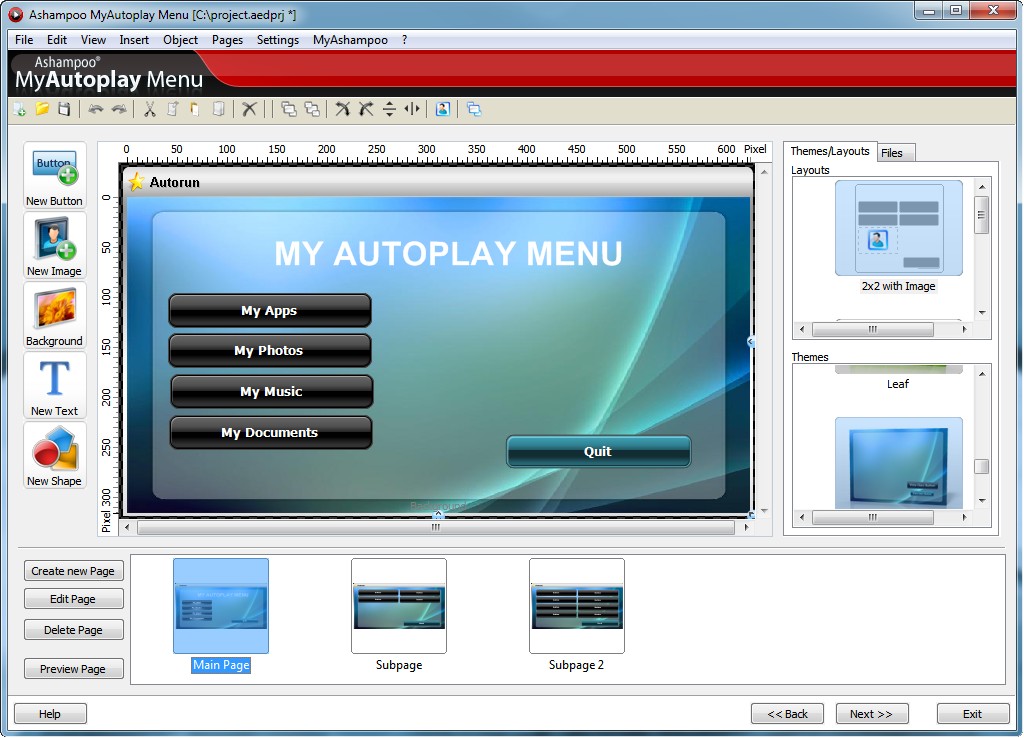
Ashampoo MyAutoPlay Menu v1.0.3.94 Multilangual


Developer: Ashampoo ® Year: 2010 Size: 16.84 MB


Ashampoo 是德国的一家公司,公司成立于1999年,国人戏称其译名为“阿香婆”,这家公司的产品线很长,出的软件五花八门,至少也有20多款软件,包括了杀毒杀马的、防火墙的、刻录的、截图的、办公的、系统优化的、系统卸载清理、磁盘整理的、图片处理的、网络视频下载的、视频转换、音乐播放的、文件加密的等等。软件界面一般都比较华丽,但其软件并非华而不实,有很多软件越加受到国人的喜爱。 . Ashampoo® MyAutoplay Menu 用于:带导航菜单的多媒体光盘,演示和交互式精美光盘,便携应用程序 U 盘,特殊礼物等等… 当您插入商业软件的光盘时,它常常会自动播放,自动打开一个图形菜单程序,您可以方便的进行选择,例如安装程序、显示网页、查看文档或材料信息等。 手工创建这些光盘和自动播放程序通常需要很多工作,且需要有编程技术 – 而且即使您有这些技能,也往往需要很长时间。 Ashampoo MyAutoplay Menu 可以轻松创建自动播放光盘,只需要在界面上简单选择点击。它还包含了 CD、DVD 刻录功能,使用本程序即可完成所有工作。 创建自动播放 CD、DVD 或 U 盘 除了使用 CD 和 DVD 外,Ashampoo MyAutoplay Menu 还可以创建自动播放的 U 盘,插入 U 盘时会自动显示交互式多页面菜单 。您可以带多页幻灯片展示的光盘或带导航菜单的电影光盘。还可以创建包含多种便携式应用程序的 U 盘,直接通过导航菜单选择启动程序。 除此之外,您还可以把自动播放内容保存到硬盘中的文件夹里,以后直接复制到光盘中或进一步处理相应的文件。 独立程序或基于浏览器显示的菜单 Ashampoo MyAutoplay Menu 提供了两种方式显示自动播放的导航菜单:插入光盘或 U 盘时以独立程序方式自动启动,它可以在所有 Windows 系统的计算机上使用,或是作为 HTML 文件,在任何浏览器中显示。所有程序功能,除显示启动画面外,在两种显示方式下都有效。 功能和特性 当插入光盘或 U 盘时自动显示图形菜单供用户选择。您可以自行设计“启动画面” – 在程序菜单出现前显示的一段短的图形闪屏。您可以创建多页面菜单,里面包含功能按钮执行相应功能和导航按钮切换菜单页面,页面间转换时会显示过渡效果。按钮的功能包括启动程序、打开文档、打开网页、创建 Email 以及大量页面导航相关选项。您可以添加背景音乐和声音,选择只播放一次或在显示菜单时循环播放,支持多种格式音频文件。 内容 创建的光盘或 U 盘可以包含任何喜欢的内容 – 可以定义文件夹结构选择要包含的文件和文件夹。它事实上是一个外带创建自动播放程序和菜单的数据 CD 创建程序。 选择点击式编辑器和光盘刻录 创建自已的菜单相当容易:您只需要选择并点击即可添加和定位对象。程序精选了大量预置图形主题和按钮布局,直接就可用来快速创建自动播放程序。除了按钮,您还可以添加文本、几何图形、背景图片、附加图片和表格等,表格编辑器可以编辑对应的格式信息。 程序还可以直接从扫描仪、数码相机、Internet 网页、本地文件或其它来源获取图片,用作背景或其它菜单组件。


About the program: Ashampoo MyAutoplay Menu - a new program to create autorun menu for multimedia discs. When you insert a commercial CD with the program, it usually starts automatically and displays a menu for user choice: run the installation program, view the documentation, review the disk, view a demonstration or a Web page. To create such a disk by hand requires a lot of time and required expertise in programming. Ashampoo MyAutoplay Menu allows you to create these discs in just a few clicks using the built-in it all the necessary tools. In addition, Ashampoo MyAutoplay Menu includes the ability to record a CD or DVD disks directly from the program without third-party applications. The program interface is multilingual and includes support for the Russian language.


Features Ashampoo MyAutoplay Menu:


"Creating a CD, DVD and USB drives with autorun feature "Disks are in themselves include any programs and different content "Creating multi-line interface "It includes the ability to record CDs directly from the program "You can display the screen saver before running the autorun menu "Adding background music and sounds "Adding buttons for navigation and perform tasks "Function test and preview the result "Built-in templates and themes menu and splash "Animated transitions between menu pages "Use your own icons and program disks On file: Enabling | reg code: Present Interface Language: Russian File format:. Rar Platform / OS: Microsoft Windows 2000, XP, Vista and Seven "Use your own icons and program disks

主题推广


回复

使用道具 举报

发表于 2021-8-6 00:33:43 | 显示全部楼层
回复 支持 反对

使用道具 举报

发表于 2021-8-6 01:24:26 | 显示全部楼层
|


10月16日更新v9.20资源下载链接来自ShareVirus


代码 ²²     ² ² ²    ²²    ² ² ²²²   ² ²  ²²    ² ²  ²² ²  ²² ²  ²²  ° ² ± ²² ²² ² ²²  ² ²² ² ±± ²   ²²  ²° ²² °° ²  ²  ²   °° ²²  ²  ²²   ² ² ²   ²²² ²  ²  ² ²²   ±²²²²²² ° ²²  ²²  ²²²²²²  ²²  ²² ²  ²   ²²² ²°²    ²²²        TE 2009 PRESENTS      ² ²            ANOTHER FINE RELEASE      Release: Ashampoo Burning Studio 9 v9.20 (c) 2009 Ashampoo Date: 10/14/2009 Cracked By: Twisted EndZ Release Type: [ ] Registration/Serial Crack [ ] Activation Crack [ ] Trial Crack [ ] Server Check Crack [X] Serial [ ] Hidden/Added Features Enabler [ ] Other [ ] Loader Patcher [ ] Patch [ ] Precracked [ ] RegFile [ ] Keygen   ² ² ² ² ²²     ²² ²²  RELEASE NOTES  ²² ²     ²  ²   ²  ²² ²²   Ashampoo Burning Studio 9 is a major update that improves almost every aspect of the program, adding many new features and capabilities in every part of the program. It also introduces a new Movie Editor for editing and combining your videos before burning them to DVD. The Movie Editor has functions for cutting, transitions, fades, subtitles, titles and more, plus a point-and-click DVD menu editor with animated themes for creating great-looking interfaces for your DVD movies. The new version also packed with improvements, new features and fine tuning that make all Burning Studio’s functions more powerful and even easier to use. Easy, not limited Anyone who has ever struggled with complicated disc burning software is always amazed when they try Ashampoo Burning Studio. This is how software should be: Instead of studying complicated manuals you just choose what you want to do and then follow the instructions displayed on the screen. For example, to make a DVD you select Create a Video DVD and the program guides you through the steps of adding clips, building menus and burning the disc. This doesn’t mean the program has been “dumbed down”: Burning Studio is a complete and powerful disc burning suite that also satisfies advanced users with all the tweaking features you expect from less accessible programs. General program improvements In addition to user interface fine-tuning there has been a large number of new features added, many of which were suggested by Burning Studio users. The items in the following list are just the top highlights New features in Burning Studio 9: • New Movie Editor and Movie Player • Play all videos, slideshows and movies in the new Movie Player • New project type: Video Edit DVD with Movie Editor • Create MP3 or WMA CDs from lists of tracks with multiple formats • Preview images are now automatically exported to Cover Editor • New options dialogs for video, audio, decoder, encoder and drive settings • Selectable program skins for user interface • Many user settings are saved and reloaded automatically • Many new burners added to the database • DVD projects are now saved with all slideshows and movies • Automatic check for conflicts with other programs with user warning Movie Editor highlights The biggest new feature of Ashampoo Burning Studio 9 is the Movie Editor, which adds powerful video editing and DVD interface building capabilities to the program. This is not just a little clip trimmer – you won’t need any other video editing software. Movie Editor has all the features you need to turn your clip collection and home videos into impressive finished movies. You also get a brand new Movie Player with a significantly improved video rendering engine and a modern graphical interface. New features in Burning Studio 9: • Edit videos with timeline and preview • Super-easy drag-and-drop editing for videos, subtitles etc. • Graphical timeline for clips, transitions, titles, subtitles and images • Burn finished movies to DVD with animated menus • Ready-to-use themes for DVD menus • Cut clips into separate blocks, trim and extract sections • Assemble multiple clips in a few easy steps • Add titles, subtitles, shaped text etc. • Add images, logos and graphical shapes with fill, borders etc. • Cross-fades and graphical transitions between clips • Fade-in and fade-out for all objects (images, texts etc.) • Live preview your movies in the editor with transitions • Add background music to movies • Rotate images directly in the Movie Editor • Set start and end times for clips (play only part of clip) • Automatic search for scene boundaries Movie Player highlights: • Modern graphical interface, very intuitive with popup control tips • Volume control, display current play position and total time • Clip display with jump to position controls • Full screen mode with quick switch control Slideshow Editor The Slideshow Editor makes it a snap to turn your photos into impressive DVD slideshows with animated graphical menus. You can also include video clips in your slideshows. Just select your photos, videos and background music tracks and burn. Here too, you can produce shows instantly by choosing ready-to-use themes or get creative and design your own. Burning Studio comes with a set of attractive themes and you can download more from the Ashampoo website. New Slideshow Editor features: • Timeline editing with drag & drop and preview • Cross-fades and graphical transitions between images • Thumbnail preview for fades and transitions • Add background music for the entire show with multiple tracks • Add titles, subtitles, shaped text • Add images, logos and graphical shapes with fill, borders etc. • Fade-in and fade-out for all objects (images, texts etc.) • Rotate images directly in the editor • Ready-to-use themes Cover Editor The Cover Editor has everything you need for labeling your discs and producing cool covers for jewel cases, slim cases, DVD cases and Blu-ray cases. You can design your own or just enter a title and select one of the pre-designed themes for instant point-and-click results – it also imports track data from your discs automatically. The Cover Editor prints both on a wide range of predefined label formats and directly onto discs on printers that support this function. New Cover Editor features: • Save your own designs as themes and reuse or share them • Export projects as XML files • Scan covers directly from original CD covers • Load covers and graphics from files, the Web or the Windows Clipboard • Attractive new themes with new graphics and layouts • Editor improvements, faster operation • Draw and insert geometrical shapes with borders, fill and transparency • Group elements in the editor to move them together • Free rotation for objects and groups of objects, or snap rotate in 15°, 45° or 90° increments • Print up to 4 CDs on a single page • Printer calibration utility for maximum precision printing, calibration settings are saved for every printer used – you only need to calibrate once • Updated label and printer database with many new formats and printers • Undo function in the Table Editor Overview of features and functions • Burn and update data discs · Burn data to CD, DVD or Blu-ray discs and update previously burned discs by adding and removing files and folders. • Back up your data to single or multiple discs · Back up your valuable data to one or more CD, DVD or Blu-ray discs. Single backups can span multiple discs. Restore your backups in a single easy operation. • Rip and burn music · Rip music from CDs and burn music to audio CDs and MP3 or WMA discs on CD, DVD and Blu-ray in a variety of formats. • Burn movies and photos to DVDs and data discs · You can create slideshow DVDs with photos and video clips and you can author and burn video DVDs, Video CDs (VCD), Super Video CDs (SVCD) and data video discs. Video files are automatically converted to the necessary formats. • Movie editor with DVD authoring · Edit and assemble your movies, add transitions, titles, texts, images and background music and then burn them to DVDs. • Create high-quality DVD slideshows · Turn your photos into impressive DVD slideshows with titles, transitions and background music. • Copy CDs, DVDs and Blu-ray discs · Just insert a disc, select Copy and go to make a perfect copy. • Create and burn disc images · You can both create and burn ISO, CUE/BIN and Ashampoo’s own special ASHDISC image formats. • Erase rewriteable discs · Quick and easy erase functions for reusing rewriteable discs. • Expert burn functions for full control · Burning experts can create modified copies of existing discs (read in data structure and make changes and additions) and burn discs of all kinds with full control of all main configuration options. • Create covers and labels · The full-featured cover and label designer prints to labels or directly to printable discs. It comes with a selection of point-and-click themes for instant results and easy-to-use creative tools for designing your own layouts. NEW: Now supports LightScribe (from version 9.10 onwards) • The free update to version 9.10 finally offers LightScribe support to all users of Ashampoo Burning Studio 9. Now you can directly label the top side of LightScribe discs utilizing your LightScribe-capable drive's laser. For More Info on Ashampoo Burning Studio 9 Visit: http://www2.ashampoo.com/webcache/html/1/product_2_2210___CAD.htm TE Release Filename: tabs920x.zip   ² ² ² ² ²²     ²² ²²  INSTALLATION NOTES  ²² ²     ²  ²   ²  ²² ²²   Install ashampoo_burning_studio_9_920_sm.exe. Use the following for registration: Buy Key: ****************** Thats it! Enjoy. ²²   ²²  ²² ²² ²  ²² ²²  ²²  ²² ²²  ²² ²²² ²² ² T E 2 0 0 9 ² ²² ²²² ²² ± ²²²²²   ²²²²² ± ²² °² ° ² ²² ²² ² ° ²° ² ²² ²² ascii ²² ²² ² ²²²² °°±±²²²² by mx ²²²²±±°° ²²²²    ± ±    ²  °  °  ²  Don't Hate The Hacker, Hate The Code ° ²   ²  ² ° 
回复 支持 反对

使用道具 举报

发表于 2021-8-6 02:19:55 | 显示全部楼层
||


本资源帖谢绝任何广告及与资源无关的评论,凡涉及广告内容的评论一概删除处理!


. 买鞋子哪个网站好?首选中国最大的正品鞋网商城(http://shoes.weixiaodian.com/)、 网上正品鞋城(http://u.weixiaodian.com/shoe/)。微店网页版请从http://121.weixiaodian.com登录:手把手教你如何免费申请开通微店、怎样经营微店及如何用微店赚钱。看笑话,上


爱哈啦


(http://www.aihala.com/)。
回复 支持 反对

使用道具 举报

您需要登录后才可以回帖 登录 | 立即注册

本版积分规则

切换至【手机版】| 主站| Archiver|

JS of wanmeiff.com and vcpic.com Please keep this copyright information, respect of, thank you!JS of wanmeiff.com and vcpic.com Please keep this copyright information, respect of, thank you!

|网站地图

GMT+8, 2026-3-28 04:39 , Processed in 0.607823 second(s), 124 queries .


快速回复 返回顶部 返回列表