搜索


会员资源切换至【手机版】

切换本帖至【手机版】


开启左侧

图像HDR效果软件 ContrastMaster v1.05 retail for Adobe Photoshop|Standalone[压缩包]

  [复制链接]
发表于 2021-8-10 22:31:07 | 显示全部楼层 |阅读模式

游客,本帖隐藏的内容需要积分高于 1 才可浏览,您当前积分为 0


资源信息:


中文名


: 图像HDR效果软件


英文名


: ContrastMaster


资源格式


: 压缩包


版本


: v1.05 retail for Adobe Photoshop|Standalone


发行时间


: 2010年


制作发行


: Harald Heim


地区


: 德国


语言


: 英文


概述


:


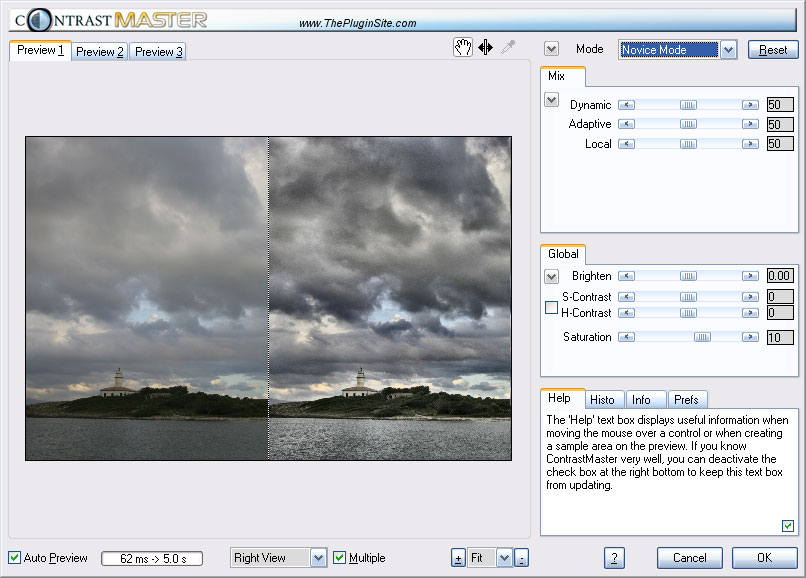
ContrastMaster图像HDR增强,图像hdr滤镜 , 适用于Windows,photowiz公司出品系列。 contrastmaster是一个Adobe Photosho插件,有效增强图像对比度,真实感和HDR一样的效果。它可以把低对比度照片处理成生动而细腻的图象,也可变换普通照片并整理为有趣的动态图形。 ContrastMaster 是一个比度调整插件。有效的反差增强以及创造鲜明对比,真实感和 HDR 效果一样。它可以将低反差的照片变成生动和富有细节的图像、普通照片转换成有趣的和充满动态的。ContrastMaster 可工作于几十个图形应用程序,包括 Photoshop, Paint Shop Pro, Photoshop Elements, Photo-Paint, IrfanView 和 PhotoImpact Windows 操作系统。为加速渲染,它支持超线程以及多处理器和核心。ContrastMaster 适用于8位和16位的RGB图像。


Features Performs effective contrast enhancement and creates dramatic contrast looks, photorealistic paintings and HDR-like effects Turns low-contrast photos into vivid and detailed images and transform ordinary photos into interesting and dynamic shots Three local and four global contrast adjustment methods as well as various masking, saturation and brightness options Six modes from the simple Novice Mode to the sophisticated Expert Mode Supports hyperthreading, multiple processors and cores Allows batch processing of image files Processes 8bit and 16bit RGB images Compatibility Plugin Version Runs as a filter plugin in Photoshop, Paint Shop Pro, Photoshop Elements, Photo-Paint, PhotoImpact, IrfanView and many other applications Works as a smart filter in Photoshop Color management depends on the host application For Windows 98, NT, ME, 2000, XP, Vista, 7 (32-bit & 64-bit) For MacOS X (PowerPC and Intel) Standalone/Lightroom Version A standalone application that supports Camera Raw, JPEG, TIFF, PNG, PSD and other image formats Works as an external editor in Adobe Lightroom for Windows Lets you open and edit multiple images non-destructively Can be used as a raw converter Supports color mangement For Windows 98, NT, ME, 2000, XP, Vista, 7 Windows Version 1.05 (September 2010) Standalone and Lightroom versions of ContrastMaster are now available. Both can open multiple images and support images with 8-bit and 16-bit/channel. The Lightroom version can be used as an external editor in Adobe Lightroom 1, 2 and 3. The Standalone version is a program that runs on its own. It offers a batch processing feature and opens the following image formats: Camera RAW (including DNG), JPEG, TIFF, PSD, PNG, BMP, TGA, PCD, PCX, WMF. It can save JPEG, TIFF, PSD and PNG files. Selections are shown in the preview. This means that the effect is not applied to pixels outside the selection in the preview. Please move your self-saved presets to the Presets sub folder at the following location to make them appear on the arrow-down menu: 2000/XP: c:\Documents and Settings\\Application Data\ThePluginSite\ContrastMaster\ Vista/7: c:\Users\\AppData\Roaming\ThePluginSite\ContrastMaster\ To avoids write permission conflicts the .ini, preset and log files are now saved in this folder. To unify the UI of all PhotoWiz plugins the following changes were made: New maximize and exit buttons on the title bar. When maximizing the window the task bar is respected. When clicking the maximize button again the normal window size correctly is restored. Double clicking the titlebar logo does not maximize the window anymore. New Instant Preview check box that makes the sliders react instantly. It is activated by default. No cursor flicker anymore when moving sliders with Instant Preview activated. New key shortcuts: H/Space for the hand tool, M for the sample area tool, I for the eyedropper and S for the splitdrag tool, + and - for zooming, R for reset. If the input focus is on an edit or combo box, you need to additionally hold down the Alt key to make the shortcut work. Double clicking the label of a slider resets it to its default value. No cursor flicker anymore when moving sliders with Instant Preview activated. The Reset button now deactivates the Show Blown Highlights check box. On the Info tab sheet only 8-bit pixel values are shown (even for 16-bit images). Under Vista and 7 the height of the sliders is slightly larger to avoid cuting off the arrows buttons. The "Auto Preview" check box was renamed to "Preview". The "Multiple" check box was renamed to "Multi" "Deactivate Multiprocessor Support" was renamed to "Multi-CPU Off". If you change something on the Prefs tab sheet and press Cancel, all settings are saved. Previously you needed to press OK to save changes on the Prefs tab sheet, which meant that you would need to apply the effect to the image even if you did not want that. The rendering time is measured more accurately. Bug Fix: Deinstalling the demo version after the full version was already installed, causes no problems for the full version anymore. All files are now installed in the "The Plugin Site" sub folder of the Program Files folder by default. Additionally "The Plugin Site" sub menu of the Start menu is now used for installation items. Support for silent installation: If you run the installer with the /silent or /verysilent command line parameter, the installation will run automatically and require no click. Plugin Installer will then automatically install the plugin in every supported application that it can find. Plugin Installer supports more applications, e.g. Sagelight and Fireworks CS2 to CS5, and displays less options during installation.

主题推广


回复

使用道具 举报

发表于 2021-8-10 23:24:45 | 显示全部楼层
回复 支持 反对

使用道具 举报

发表于 2021-8-11 00:16:49 | 显示全部楼层
|


本资源下载链接来自ShareVirus


代码   °±±±±±±±±±±±±±±±±±±±  ²²²±²²²²²²²²²²²²²²²²²²²²²± ²°° ° °±²²±±±±±±±±±±±±±±±±±°°±±²² ²  °±±±²±±±²±²²²²²²²²²²²²±±±± ² ±  °²° °²±²²±²²±±±±±±±±±±±±²²±± ²  ² ±± ²±±²±°°±±²²²²²±²±² ° ±²± ° ² ° ² ±° ²²±²²²²²²²±±±²²±±±±±±²²°²± °± ±± ±°  ± °  °² ²²²±±²²±±²² ± °°   ° ° ° ° °²² ²²±² ²²± °°±±   ± ± ² ² ° ±² ²²² ²²²±² ±   ±  ° °±° °² °° ² ²²  °°° ²²²  °± °² °±±±° ²  ²²²   ±²² ²²²  °° °²°° ² ±²  ²² ° °±² ± °²² ±²² ²²  °²² ² ±±² ²²± °° ° ± ²²°±²±±²²  ²±±±±²°  °±±±° ± ²²²²²²²²²²²²±  ²  ±±±±±±°° ²²²²²²²²²²²²²²²²²±²²²²²²²   ±±±±±±±±±± ²²²²²²²²²²²²²²²²²±²²²²²²²²²   °±±±±±±±±±± ±²²²²²²²²²²²²²²²±²²²²²²²²²²²°  ² ±±±±±±±±±±±° ±²²²²²²²²²²²²±²²²²²²²²²²²±²   °±±±±±±±±±±±±° °²²²²±±²²²²²²²²²²²²²²±°   °±±±±±±±±±±±±±±° ²²²±±±²²²²²²²²²²²²²²²²²±²  ° ±±±±±±±±±±±±±±±±±° °±±±±±±±±±±±±±±±±±±²²²²²²²²  ± °±±±±±±±±±±°° °±²²²²²²²²²²²²²±±±±±±±±²   °±±±±±°° °±²²²±²  ² ±°° °°²²²²²²²²²²²²²²²²²²²²²±²²  ± °° ±²²²²²²²²²²±±±°°²²²²²²²²²²²²²² °²  ± ± ²²²²²²²²²²²²²²²±±±±±±±±±²²±²²²²²²²²²²²²²° ±²  ² °± ±²²²²²²²²²²²²²²²±±±²²²²²²²²²²²²²²° ± ² ±±° ²²²²²²²²²²²²²±²²°±±±²²²²²²² ±±  °±±±° ±²²²²²²²²±±±±±±²° ²²²  °±±±±° ±²° ²²±  ±±±±±±±±²±  ²²²²    ²²²²²²²²²²²²²²²²²   ±±±±±±± ²±±±±±±±±±±±±±±²²±±±±±±±   ±±±±±±°°°°°°±± ²²²²²²²²²² ²²±±±±±±±±°±± ² ²² ²²±±±±°°°°±±±°°°°°±±  ²²±±±²²±± ²²²±± ²²±±°°±±±²²±±±±±± ²²²²²²² ²²±±°±  ²²±± ²²²±±°± ² ²²±±±± ²²²²²² ²²²² ²²±±± ²± ²² ²²²±±°± ² ²²±±± ±±  ² ²²±±°±±  ²² ²²²²± ² ²²±±± ± ²²±±±±±±± ²²±±°±± ²²²²²²²  ± ² ² ²²±±± ± ²²±±°±±±±°°±± ² ²²±±°±± ²²   ²²±±°±±±±±± ²²±±°±²²±°±±  ²²±±°±±  ²²± ² ² ²² ² ²²±±°°±±±± ²²±±°± ²²±°±±  ² ²²±±°±± ²²±°± °² ²²² ² ²²±±± ²²±±± ±±± ²²±±± ²±± ²² ²²±±°±± ²²±°±  ²²² ²²² ²²²² ²²±±±± ²² ²²±±°± ²²±°±± ²±±± ²²±±°±± ²²±°±  ²²²²² ²²²² ²²² ²²±±±± ²±² ²²±±°±²²±°±± ²²±±±±²²±±°°±± ²²±°± ²²²²² ²²²²²² ² ²²±±±± ±±± ²²±±±±±±±±±±± ²²±±±±±±±±±±±± ± ²²±±°±± ²²² ²²²²²²² ²²²²²²² ±  ²²²²²²²²²  ²²²²²²²²²²  ²²²²²±± ² ²²²²²²² ²²²²      ²²²²² ²²²    ² F.O.S.I. - P R E S E N T S ContrastMaster.v1.05.retail.for.Adobe.Photoshop-FOSI ²° ±° ±² RLS DATE ..............: 13-Oct-2010 ° ± RLS SiZE ..............: 01 * 5,00 MB ± ±² ²  RLS NAME ..............: fo-t105p.zip ² °± ² °  ° ² ² ° ± PROTECTiON ............: N/A  ±° ° ²²² ²° REQUiREMENTS ..........: Windows OS °² ²²±  ± ² ± ±±²     ° ²±   ²° ±  ±  °      ² ²  ° ±° ² ± ² °²±±    DESCRiPTiON N' iNSTALLATiON      ContrastMaster is a plugin for effective contrast enhancement as well as creating dramatic contrast looks, photorealistic paintings and HDR-like effects. It can turn low-contrast photos into vivid and detailed images and transforms ordinary photos into interesting and dynamic shots. ContrastMaster works with dozens of graphics applications including Photoshop, Paint Shop Pro, Photoshop Elements, Photo-Paint, IrfanView and PhotoImpact under Windows. For accelerated rendering it supports hyperthreading as well as multiple processors and cores. ContrastMaster works with 8bit and 16bit RGB images. ²± °² ±  ± NFO LAST UPDATED ²° ² ± ± ±± ° ± 06-11-2004 ±  ° ² ²   -----   ²  ±± °²° °²²° °  ± ±  ± °° ²²± ± ²° ±² ± ± ± ²² ° ± ° ° ² ± ° ² ± ²   ± ± °±  ± ² ² ² ² ±  ²  ° ±° ± °± ±± ² ± °² ±²±° ² ° ±    ± ±   ± ° ± ²  ² °     ²   ²  买鞋子哪个网站好?首选中国最大的正品鞋网商城(http://shoes.weixiaodian.com/)、 网上正品鞋城(http://u.weixiaodian.com/shoe/)。微店网页版请从http://121.weixiaodian.com登录:手把手教你如何免费申请开通微店、怎样经营微店及如何用微店赚钱。看笑话,上


爱哈啦


(http://www.aihala.com/)。
回复 支持 反对

使用道具 举报

您需要登录后才可以回帖 登录 | 立即注册

本版积分规则

随缘推荐

该版块暂无可用帖子

切换至【手机版】| 主站| Archiver|

JS of wanmeiff.com and vcpic.com Please keep this copyright information, respect of, thank you!JS of wanmeiff.com and vcpic.com Please keep this copyright information, respect of, thank you!

|网站地图

GMT+8, 2026-4-1 19:11 , Processed in 0.806522 second(s), 124 queries .


快速回复 返回顶部 返回列表