|
游客,本帖隐藏的内容需要积分高于 1 才可浏览,您当前积分为 0
资源信息:
中文名: Melodyne 音频编辑软件基础教程
英文名: Lynda.com Melodyne Essential Training
资源格式: 光盘镜像
主讲人: Skye Lewin
发行日期: 2012年5月14日
地区: 美国
对白语言: 英语
文字语言: 英文
概述:
语言:英语
网址:http://www.lynda.com/Melodyne-tutorials/Melodyne-Essential-Training/98829-2.html
类别:教程
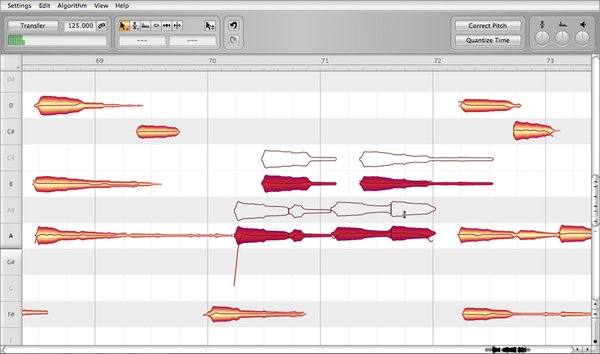
Lynda.com 出品的时长3小时10分钟的Melodyne 音频编辑软件基础教程。Skye Lewin演示了如何开始安装和设置的过程,包括为您的项目中选择最佳的工作流程和偏好设置的建议。还演示了如何导入现有的文件或录制新曲目,如何安排一个新的会话,以及如何编辑音频和修正音轨。
Topics include:
Understanding the Melodyne variants: Editor, Assistant, Essential, and Studio
Creating, moving, and deleting tracks
Setting the tone scale, meter, and tempo in a session
Working with multiple tracks (in Melodyne Studio)
Working with Direct Note Access to edit polyphonic audio (in Melodyne Editor)
Using the various editing tools in Melodyne
Correcting pitch and time automatically
Adjusting pitch and time manually with the Melodyne tools
Setting hardware, plug-in, and MIDI preferences
Editing audio with MIDI
The Mixer in Melodyne
Using Melodyne plug-in, Melodyne Bridge and ReWire
Exporting with Spot to Pro Tools
=======================================
下载链接来自TLF
未经过安装测试与安全检测,使用者后果自负与本论坛无关
软体版权归原作者及其公司所有,如果你喜欢,请购买正版
=======================================
目录:
Introduction
6m 39s
Welcome
1m 15s
Introduction to Melodyne variants
1m 37s
Installing and authorizing Melodyne
2m 13s
Using the exercise files
1m 34s
1. Getting Started
8m 4s
Choosing the best workflow for a project
2m 31s
Creating a new session and exploring essential preferences
3m 5s
Creating, moving, and deleting tracks
2m 28s
2. Setting Up and Working with Sessions
35m 54s
Importing audio for the stand-alone workflow
1m 51s
Identifying elements in the session folder
1m 38s
Exploring the Arrangement and Editor windows
6m 32s
Exploring the Mixer window
2m 47s
Exploring the Transport window
2m 44s
Changing pitches and formants with realtime play offsets
3m 37s
Managing audio files
2m 16s
Exploring Melodyne's menus
2m 54s
Exploring view options
2m 58s
Using markers
3m 3s
Scrolling and zooming
1m 31s
Setting the tone scale, meter, and tempo
1m 32s
Setting the loop/session boundary locators
1m 14s
Working with multiple tracks
1m 17s
3. Editing Audio
1h 18m
Setting up a new session and importing audio
4m 4s
A look at note blobs
1m 29s
An overview of Melodyne's tools
45s
Using the Pitch tool and subtools
5m 57s
Using the Edit Formant tool
2m 53s
Using the Amplitude tool
50s
Using the Move Notes tool and Edit Time Handle tool
5m 6s
Using the Note Separation tool and Segment Separation Tool
3m 52s
Using the Main tool
1m 37s
Exploring additional tools in the MDD Editor
4m 31s
Correcting pitch and time automatically
4m 15s
Copying and pasting
1m 25s
Editing pitch
12m 4s
Editing time
4m 20s
Editing an example exercise, part one
14m 31s
Editing an example exercise, part two
10m 51s
4. Exploring the Preferences
14m 41s
Exploring hardware setup, file types, and the Appearance page
1m 50s
Specifiying the defaults for new projects using New Arrangements
36s
Exploring the Plug-ins page
49s
Setting MIDI preferences
1m 51s
Using the Detection settings
1m 15s
Building custom shortcuts
6m 6s
Looking at preferences in the Other page
2m 14s
5. Editing Audio with MIDI
11m 10s
Setting up a MIDI input source
1m 12s
Using a MIDI keyboard to play and edit notes
7m 8s
Exploring the MIDI Out options
2m 50s
6. Melodyne's Mixer
6m 25s
Using the mixer
4m 44s
Using plug-ins and auxes
1m 9s
Using a MIDI controller
32s
7. Melodyne Configurations
22m 1s
Transitioning to Melodyne Editor (aka singletrack)
1m 33s
Exploring how to use Direct Note Access (DNA)
7m 39s
Setting up Melodyne Bridge
3m 54s
Setting up ReWire
4m 41s
Using the Melodyne plug-in
2m 5s
Synchronizing
2m 9s
8. Exporting
6m 35s
Exporting audio when finished
2m 39s
Exporting with Spot to Pro Tools
1m 53s
Printing final audio into your DAW
2m 3s
Conclusion
36s
Exploring additional resources
36s
代码
.do-"""""'-o.. *
.o"" "".. ***
,,'' ``b. *
d' ``b
d`d: `b. ***
,,dP `Y. ***
d`88 `8. **
8`88' `8 **
Y:d8P 8, **
P,88b ,`8 **
::d888, ,8:8. **
dY88888 `' :: **
8:8888 `b *** *
Pd88P',... ,d888o.8 ***
:88'dd888888o. d8888`88:
,:Y:d8888888888b ,d88888:88:
:::b88d888888888b. ,d888888bY8b ***** * **
b:P8;888888888888. ,88888888888P ****** ** **** *
8:b88888888888888: 888888888888' ** * * ** ****
8:8.8888888888888: Y8888888888P * * * ** * *
YP88d8888888888P' ""888888"Y * * ** *
:bY8888P"""""'' : ** ** ** *
8'8888' d ** ** ** *
:bY888, ,P ** ** ** *
Y,8888 d. ,- ,8' ** ** ** *
`8)888: ' ,P' ** ** ** *
`88888. ,... ,P * ** ***
`Y8888, ,888888o ,P * ***
Y888b ,88888888 ,P' **** **
`888b ,888888888 ,,' * *****
`Y88b dPY888888OP :' * **
:88.,'. `'` p *
)8P, ,b ' . **
:p d,'d`b, ,8
. dP' d8': ,
'8P" d8P' 8 - p *****
d,' ,d8' '' : ******
iNK H0RN Presents .. d' 8P' d' '; ** * * **
,: `' d p. * * * **** *
,dooood88: , ,d `` `b. * * ****
.o8"'""""""Y8.b 8 `"'' .o' ` """ob. ** ** * **
dP' `8: K dP'' "`Yo. ** ** *
dP 88 8b. ,d' ``b ** *****
8. 8P 8""' `" :. ** ** ***
:8: :8' ,: :: ** ** ***
:8: d: d' :: * ** ***
:8: dP ,,' :: * ***
`8: :b dP ,, :: **** ***
,8b :8 dP ,, d * ***** *** *
:8P :8dP d' d 8 * *** ***
:8: d8P d' d88 :P *
d8' ,88' ,P ,d888 d' **
88 dP' ,P d8888b 8
,8: ,dP' 8. d8''88' :8
:8 d8P' d88b d"' 88 :8
d: ,d8P' ,8P""". 88 :P
8 ,88P' d' 88 :8
,8 d8P 8 Rls Date : 01/06/12 88 :8
d: 8P ,: Type : Bookware :88 :8
8',8:,d d' Supplier : iNK H0RN :8: :8
,8,8P'8' ,8 Disks : 1 CD 8' :8
:8`' d' d' Archive : i-lynmet 8 p:
`8 ,P :8 # Files : 38 x 15 MB :8: p:
8, ` d8. :8: 8:
:8 d88: d8: 8
`8, d8888 88b 8
88 ,d::888 888 Y:
YK,oo8P :888 888. `b
`8888P :888: ,888: Y,
``'" `888b :888: `b
8888 888: ::
8888: 888b Y.
8888b :888 `b
88888. `888, Y
dPdPdPdPdPdPdPdPdPdPdPdPdPdPdPdPdPdPdPdPdPdPdPdPdPdPdPdPdPdPdPdPdPdPdPdPd
: Lynda.com - Melodyne Essential Training
PdPdPdPdPdPdPdPdPdPdPdPdPdPdPdPdPdPdPdPdPdPdPdPdPdPdPdPdPdPdPdPdPdPdPdPdP
: DESCRIPTION
In this course, author Skye Lewin explores how to harness the power of the leading pitch correction software, Melodyne. The course b
Topics include:
Understanding the Melodyne variants: Editor, Assistant, Essential, and Studio
Creating, moving, and deleting tracks
Setting the tone scale, meter, and tempo in a session
Working with multiple tracks (in Melodyne Studio)
Working with Direct Note Access to edit polyphonic audio (in Melodyne Editor)
Using the various editing tools in Melodyne
Correcting pitch and time automatically
Adjusting pitch and time manually with the Melodyne tools
Setting hardware, plug-in, and MIDI preferences
Editing audio with MIDI
The Mixer in Melodyne
Using Melodyne plug-in, Melodyne Bridge and ReWire
Exporting with Spot to Pro Tools
http://www.lynda.com/Melodyne-tutorials/Melodyne-Essential-Training/98829-2.html
PdPdPdPdPdPdPdPdPdPdPdPdPdPdPdPdPdPdPdPdPdPdPdPdPdPdPdPdPdPdPdPdPdPdPdPdP
Interested in joining iNK ? We're currently looking to expand.
: Suppliers - Cisco / Microsoft Training
: Suppliers - Online Subscriptions - TestOut/Nuggets/PrepLogic etc..
: Suppliers - MCT Access MOC/Technet
: Suppliers - Often Buy Training/Subscriptions for yourself ?
Or if you feel you can contribute in other ways, please contact..
-----> Email - inkme@hush.ai
dPdPdPdPdPdPdPdPdPdPdPdPdPdPdPdPdPdPdPdPdPdPdPdPdPdPdPdPdPdPdPdPdPdPdPdPd
8 8
8 8
8 : INSTALLATION 8
8 8
8 a. Extract 8
8 b. Mount/Burn 8
8 c. Play & Learn 8
8 8
8 8
PdPdPdPdPdPdPdPdPdPdPdPdPdPdPdPdPdPdPdPdPdPdPdPdPdPdPdPdPdPdPdPdPdPdPdPdP
: RESPECT DUE
DDUiSO .. JGTiSO .. AG .. CFE .. LiBiSO
|
|


 发表于 2021-8-16 16:42:38
/thumb.jpg)
/thumb.jpg)
