|
游客,本帖隐藏的内容需要积分高于 1 才可浏览,您当前积分为 0
资源信息:
中文名: HDR图像处理软件
英文名: HDRSoft Photomatix Pro
资源格式: 压缩包
版本: v4.2.3 x86/x64
发行时间: 2012年
制作发行: HDRsoft
语言: 英文
概述:
软件类型:软件>图形图像
软件性质:破解软件
操作系统:Windows
应用平台:Windows 98/ME/2000/XP/Vista/7
问题反馈: http://www.hdrsoft.com/support/index.html
网站链接: http://www.hdrsoft.com/index.html
软件介绍:
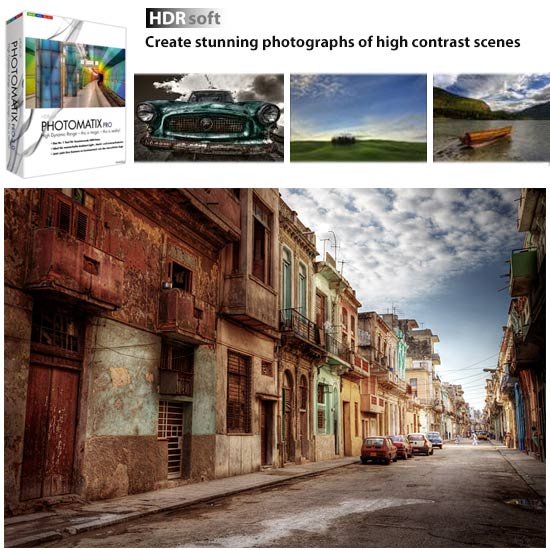
HDRsoft Photomatix Pro用来处理同一场景下不同曝光设置的照片。这些照片称为包围曝光照片,许多型号的相机都有自动包围曝光功能。
Photomatix是一款数字照片处理软件,它能把多个不同曝光的照片混合成一张照片,并保持高光和阴影区的细节。打开在同一场景拍摄的不同曝光度的照片,选择一个曝光混合方法,Photomatix Pro能让你在6种联合模式中选择:平均+5种曝光混合方法,每个方法都基于不同的算法。
=======================================
下载链接来自sharevirus
未经过安装测试与安全检测,使用者后果自负与本论坛无关
软体版权归原作者及其公司所有,如果你喜欢,请购买正版
=======================================
Photomatix Pro processes multiple photographs of a high contrast scene into a single image with details in both highlights and shadows. Photomatix offers two types of processes to increase the dynamic range. One process is called HDR Tone Mapping, the other Exposure Blending. Both processes are designed to produce an image with an increased apparent dynamic range, but their results are different. You should try both and then choose the result that works best with your images. The first section of this manual provides tips for taking photographs intended for High Dynamic Range (HDR) processing in Photomatix Pro. The second section describes how to create HDR images and process them through Tone Mapping. The third section deals with the Exposure Blending functions, and the fourth section with the Batch Processing tool. Finally, section five provides a few tips and techniques.
Features:
» Generation of HDR (High Dynamic Range) images from differently exposed images
» Conversion of single RAW file into pseudo-HDR image
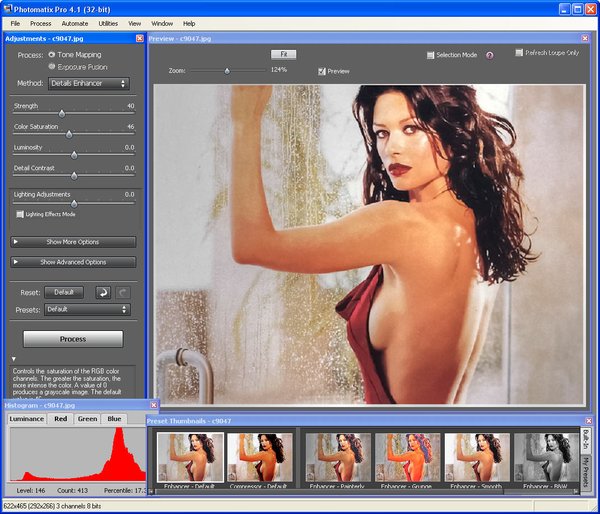
» Tone Mapping tool for revealing highlights and shadows details in HDR image
» HDR Viewer shows local HDR image data at the appropriate exposure
» Display of HDR Histogram (logarithmic)
» Ability to batch tone map single HDR images
» Function to tone map large HDR image files while benefiting from a preview
» Read and Write support for Radiance RGBE (.hdr), OpenEXR (.exr) and Floating Point TIFF
» Color managed HDR workflow: passing trough of ICC color profiles from the source to the tone mapped images, and color managed display
» Four algorithms for Exposure Blending
» Automatic alignment option for hand-held images with two alignment methods available
» Preview and Loupe available for all Exposure Blending methods
» Ability to select the images for method 'H&S - 2 images'
» Automatic Batch Processing
» Support JPEG, TIFF, Radiance RGBE, OpenEXR, PNG, PSD, RAW files from several camera models
代码
²
²²ÜÜÜÜ
Þ²ÛÛÛÝ
Þ²ÛÛÛÝ ß ÜÜÜÜÜÜÜÜÛÜÜ
ÞÛÛÛÛÝßßßßßßßßÛÛÜÜ ÜÜÜÛßßßßßßßÛÛÜÜ ÜÜ ² ÜÛßßßßßß ÜÜÜ ßÛÛßßßßßßßßßßßßÛÜÜ
ÞÛÛÛÛÛßßßÛÛÛÛÜÜÜ ßÛÛß ÜÜÜÛÛßßÛÜÜÜ ßßßÛÛß ²ÜÜÜÜÛÛßßßÛÛÛÛÛÝß ÜÛÛÛÜÛßßÛÛÛÜÜÜ ß
ÛÛÛÛÛÛ ßÛÛÛÛÛÜ ÜÛÛÛÛß ßÛÛÛÛÛÜ Ý ÜÛ²ÛÛÛß ÞÛÛÛÛÛ ÛÛÛÛÛß ßÛÛÛÛÛÛÜ
ÞÛÛÛÛÝ ÞÛÛÛÛÛ ÛÛÛÛÛÝ ÞÛÛÛÛÛÝ ÞÛ²²ÛÛ ÛÛÛÛÛÝÞÛÛÛÝ ÞÛÛÛÛÛÛÝ
ÞÛÛÛÛÝ ÛÛÛÛÝÞÛÛÛÛÛ ÜÛÛÛÛß Ûß²²ÛÝ ÞÛÛÛÛÝÞÛÛÛÝ ÛÛÛÛÛÛÛ
ÞÛÛÛÛÝ ÛÛÛÛ ÛÛÛÛÛÝ ÜÜÛßßß ÜÜÜÛ²ÛÝ ÞÛÛÛÛÝÞÛÛÛÝ ÛÛÛÛÛÛÛÝ
ÞÛÛÛÛÝ ÛÛÛÛÝÞ²ÛÛÛÛ ÜÜÛÛÛÛÛÛ²ÞÛ ÞÛÛÛÛÝÞÛÛÛÝ ÞÛÛÛÛÛÛÝ
ÞÛÛÛÛÝ °°°° ÞÛÛÛÛÛ²²ÛÛÛÛÝ °°°°° ÜÛÛÛÛÛÛÛÛÛ² ÛÝ °°°°° ÛÛÛÛÛÝÞÛÛÛÝ °°°°° ÞÛÛÛÛÛÛÛ
ÞÛÛÛÛÝ ÜÛÛÛÛÛÛ²²ÛÛÛÛÛÝ ÛÛÛÛÛÛÛÛÛÛÝÞÛÜ ÞÛÛÛÛÛÝÞÛÛÛÝ ÞÛÛÛÛÛÛÝ
ÞÛÛÛÛÝ ÜÛÛÛÛÛß Ü ²ßÛÛÛÛÛÜ ÞÛÛÛÛÛÛÛÛÛÛ ßÛÛÜÜܲßÛÛÛÛÛÝÞÛÛÛÝ ÛÛÛÛÛÛÛ
ßßßßßÛÜßßßß ÜÜÜÜÛÛÛÛÜ ßßßßßßÛÜÜÜÛÛÛÛßßßß ÜÜÜÜÜÜÜÜܲ ßßßßß ßßßßß ÜÜÜÜ ÞÛÛÛÛÛÛß
ßßßÛÜÜÜÜÛßßßßß ßßßßßßßßÛÜÜÜÜÜÜÜÜÜÜÛßßßßsQz²ßßßßßßßßßßßßßßßß Ûßßß
²ß
ß²
ÜÜÜÜÜÜÜÜÜÜÜÜÜÜÜÜÜÜÜÜÜÜÜÜÜÜÜÜÜÜÜÜÜÜÜÜÜÜÜÜÜÜÜÜÜÜÜÜÜÜÜÜÜÜÜÜÜÜÜÜÜÜÜÜÜÜÜÜÜÜÜÜÜÜÜÜÜ
ÛÛÛßßß ßßßÛÛÛ
Ûß Photomatix Pro v4.2.3 (C) HDRSoft ßÛ
Ûß ßÜ
² ÄÄÄÄÄÄÄÄÄÄÄÄÄÄÄÄÄÄÄÄÄÄÄÄÄÄÄÄÄÄÄÄÄÄÄÄÄÄÄÄÄÄÄÄÄÄÄÄÄÄÄÄÄÄÄÄÄÄÄÄÄÄÄÄÄÄÄÄÄÄÄÄÄÄÄ ²
± Disks: 3 x 2,88mb Date : July 6, 2012 ±
° OS : Windows x64 Type : Serial °
Ü ÜÜÜÜÜÜÜÜÜÜÜÜÜÜÜÜÜÜÜÜÜÜÜÜÜÜÜÜÜÜÜÜÜÜÜÜÜÜÜÜÜÜÜÜÜÜÜÜÜÜÜÜÜÜÜÜÜÜÜÜÜÜÜÜ ÜÜ Ü
ßÜßß
Ûß
² Release Description:
± ~~~~~~~~~~~~~~~~~~~
°
° Photomatix Create stunning photographs of high-contrast scenes
°
° If you have ever photographed a high contrast scene, you know that even
° the best exposure will typically have blown out highlights and flat shadows.
° The solution is High Dynamic Range (HDR) processing:
° - Take multiple photographs at varying exposure levels
° - Merge the photos in Photomatix into an HDR image that reveals highlight
° and shadow details.
° - Adjust the settings to get the look you want: from natural-looking with
° Exposure Fusion to painterly or surreal with Tone Mapping.
°
°
Ü ÜÜÜÜÜÜÜÜÜÜÜÜÜÜÜÜÜÜÜÜÜÜÜÜÜÜÜÜÜÜÜÜÜÜÜÜÜÜÜÜÜÜÜÜÜÜÜÜÜÜÜÜÜÜÜÜÜÜÜÜÜÜÜÜ ÜÜ Ü
ßÜßß
Ûß Installation:
² """""""""""""""
±
° Just unpack&install. Register with the serial in serial.txt.
°
Ü ÜÜÜÜÜÜÜÜÜÜÜÜÜÜÜÜÜÜÜÜÜÜÜÜÜÜÜÜÜÜÜÜÜÜÜÜÜÜÜÜÜÜÜÜÜÜÜÜÜÜÜÜÜÜÜÜÜÜÜÜÜÜÜÜ ÜÜ Ü
ßÜßß
Ûß Greetz:
² """""""""""""""
±
°
Ü ÜÜÜÜÜÜÜÜÜÜÜÜÜÜÜÜÜÜÜÜÜÜÜÜÜÜÜÜÜÜÜÜÜÜÜÜÜÜÜÜÜÜÜÜÜÜÜÜÜÜÜÜÜÜÜÜÜÜÜÜÜÜÜÜ ÜÜ Ü
ßÜßß
Ûß Contact Us:
² """""""""""""""
±
°
ßßÛÜÜÜÜ Ü Ü ÜÜÜÜÛßß
ßßßßßßßßßßßßßßßßßßßßßßßßßßßßßßßßßßßßßßßßßßßßßßßßßßßßßßßßßßßßßßßßßßßßßßßßßßß
| 

 发表于 2021-8-16 19:14:11
/thumb.jpg)
/thumb.jpg)
/thumb.jpg)
/thumb.jpg)
/thumb.jpg)
/thumb.jpg)
