|
游客,本帖隐藏的内容需要积分高于 1 才可浏览,您当前积分为 0
资源信息:
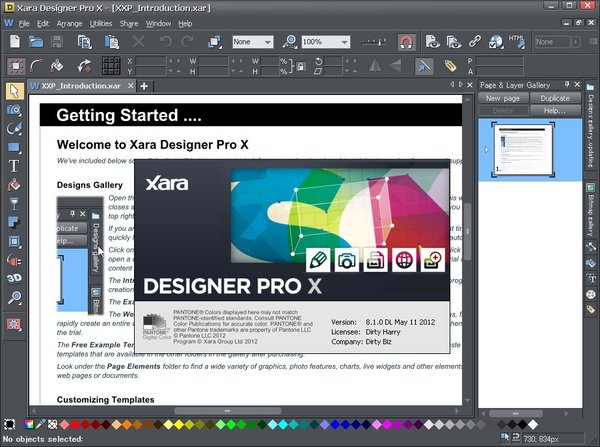
中文名: 图片设计软件
英文名: Xara Designer Pro X
资源格式: 压缩包
版本: v8.1.2.23228
发行时间: 2012年
制作发行: Xara Group Limited,
a MAGIX AG company.
地区: 英国
语言: 英文
概述:
Photo & Graphic Designer 是英国向量图形软件公司Xara开发的老牌图片设计软件 Xara,可以用以绘图、处理图片、制作WEB图形、具有制图速度快、软件体积小、介面美观等特点、被誉为世界上速度最快的绘图软件。
Photo & Graphic Designer 拥有大量的图片编辑工具包括即时的信号、透明度、现实的影子实现、所有一类刷子、使效果成斜面等,且Xara Xtreme的绘图工具简单易用,跟Photoshop一样,每个绘图工具都有相应的属性栏,结合工具列中的颜色、图层、框架等功能调整,就能制作出专业水准的设计作品。
资源更新列表
http://www.VeryCD.com/i/5190747/create/fol...postTime
Xara Designer is famous for its speed and unrivalled ease of use, making it not just a highly productive tool, but a pleasure to be creative.
Speed
Xara Designer is based on the world’s most sophisticated, highest performance vector rendering engine. Quite simply this makes it the fastest graphics software to be found.
Direct Action Tools
Xara Designer’s Direct Action Tools allow you to create effects such as transparency, shadows, bevels or gradient fills in an interactive, fast and intuitive way. No distracting dialogs – simply drag on the object!
Easy Drag & Drop
Many tasks in Xara Designer benefit from being able to use the drag and drop principle, which is the most intuitive way of working and a great time saver. It also supports drag and drop import of files, such as photos.
Solid Object Editing
Instead of dragging outlines when you draw, move, rotate or resize objects, Designer offers solid live object manipulation, which simply makes it much easier to see what you’re doing! Only Designer is fast enough to do this on complex vector graphics.
Infinite Undo / Redo
Being able to change what you have done is vital in a graphics package. Xara Designer allows unlimited undo, making experimentation easy.
Zoom to 25,000%
The Zoom tool allows magnification up to 25,000%, perfect for detailed work. And it’s super-fast and resolution independent too.
Top Quality Screen Display
Xara introduced the world’s first vector anti-aliasing to bring maximum screen quality and is still a pioneer with the fastest, highest quality anti-aliasing available in any drawing program.
All The Creative Tools You Need
Xara Designer offers all the tools that a creative designer could need for illustration, text handling and page layout.
Text & Page Layout
Designer offers everything you need for professional page layout, combining advanced text controls (including Text Styles, multi-column and multi-page text flow, text on a curve, spell checker, numbered and bulleted lists to name just a few) with flexible page layout features such as drag and drop of images and automatic text flow around objects. It adds up to complete design freedom for all your page design work!
Drawing Tools
Xara Designer is the primary tool of many illustrators and includes a set of powerful but really easy to use vector line and shape drawing and editing tools.
The Quickshape tools (rectangle, circle etc) allow you to draw pre-set shapes very quickly and easily. Editing shapes and lines is easy and the Freehand line drawing tool even offers a slider for retroactive smoothing after you’ve drawn your line.
Two powerful new tools in v8 allow you to easily erase and (in Pro only) build on your image, whether it’s a vector drawing or a photo.
3D Extrude
The world’s fastest, slickest, and highest quality vector 3D extrude tool.
Take any shape, and just drag on the face to create a beautifully lit and shaded 3D version. Drag on the sides to extend the extrude depth. It couldn’t be easier.
Blends
The blend tool tweens or blends from one shape to another. It’s ultra-fast, click-drag simple, works with vector shapes, text and photos.
Blends can be used to create complex highlights, blurred edges on objects, repetitive patterns and many other effects, in other words it’s a vital tool for creative design. Designer performs blending in a very quick and memory-efficient way compared to other drawing packages – meaning less waiting for you and less draining of your systems resources.
Transparency & Feathering
Xara was the first vector application to introduce transparency, and continues to this day to offer the easiest, most advanced transparency control of any software. With click-drag simplicity you can create graduated transparencies to any object, photo, text, and vector shape.
Xara was also the first application to offer vector feathering (sometimes called Soft Vectors). This is a technique of slightly blurring the edges of objects to help them blend into the background and enables high quality realistic images to be created more quickly and easily than in any other software.
The combination of feathering and transparency is great for any photo composition work, as well as realistic vector shading, vital for any good illustration.
Live Effects
Live Effects are plug-in effects that can be applied to any object, including vector drawings – they are called Live Effects because the vector object remains editable even after applying the effect. Most modern Photoshop plug-ins work as Live Effects, giving access to a huge range of special effects (and more than 40 plug-ins are included).
Shadows, Bevels & Contours
Xara Designer offers several powerful tools that allow you to add realistic effects with a single click. Apply, remove, and modify semi-transparent (or ‘soft’) shadows to any object with the Shadow tool. Use the Bevel tool to add bevels to any object, giving them the realistic appearance of depth. And add contours around objects with the Contour tool. All resolution independent (don’t lose quality when you scale them)!
Revolutionary Photo Handling
Xara Designer photo handling beats other graphics programs on many fronts.
Fast, non-destructive photo handling
Xara Designer photo handling beats other graphics programs on many fronts. It’s much, much faster, produces smaller files and it’s non-destructive. It makes the perfect photo composition tool.
Designer offers completely non-destructive photo editing (which means you can edit your photo as many times as you like without the loss of quality that is normal in other photo programs), and it uses a fraction of the RAM required by other products. It can handle multiple very high resolution images with ease, even on a modest PC.
Designer is also unique in the way it handles and stores photos, which means that files containing photos can be anywhere from 3 to 100 times smaller than with other programs.
Integrated Photo Tool
Xara Designer includes a revolutionary integrated, ultra-fast, non-destructive photo editing tool. It offers real-time photo enhance (brightness levels, sharpen, blur etc) plus real-time scaling and rotation even on 50 Megapixel images. Other features include flexible cropping, red eye removal, perspective correction, photo erase and masking tools and the innovative content aware scaling and zooming.
Combine this with vector masking, layer blending, feathering – all in the non-destructive, memory efficient way – and you have something that no other photo tool can provide.
Magic Photo Erase tools
The Magic Photo Erase tool makes it quick and easy to seamlessly erase unwanted objects from your photo completely.
See more examples
Plus v8 adds another powerful tool for photo manipulation, the new Color Select & Erase tool. So now you can erase or make transparent parts of a photo based on a color, or edit just those color-selected areas. So whether you want to change the color of an object in your photo, brighten up a blue sky or remove a dark background we have the perfect tool for you!
The new v8 Shape Erase and (in Pro) Shape Builder tools work too so it’s a snip to delete parts of your photo with a paintbrush type action.
Photo Panoramas
Perhaps the easiest to use panorama maker. Drop a series of photos on the page, click one button and you’ll get a perfect, seamless joined panoramic image.
Intelligent Scaling
The Photo Tool includes innovative intelligent image scaling technology that allows ‘content aware scaling’, which means images can be stretched or squashed while retaining the proportions of important parts of the picture.
This can provide a near miraculous ability to stretch and change the aspect ratio of photos, without apparently distorting the content of the photo.
And there is also ‘content aware zooming’, which works in a similar way but allows you to resize the object that is the center of interest without increasing the size of the total image.
Bitmap Tracer
Xara Designer’s powerful bitmap tracer can convert your bitmaps – typically photos, line-art or logos – into editable vector shapes.
Adobe Photoshop® Plug-ins
Xara Designer supports Adobe Photoshop® plug-ins. There’s already a huge range of such plug-ins available, both free and commercial, for creating a variety of effects that would take a lifetime to explore.
In addition the Live Effects tool, the most advanced of any available, enables you to apply these plug-ins to photos and vector shapes for a range of amazing visual effects.
Designer includes more than 40 built-in Live Effect plug-ins.
Designer Pro & The Web
Photo and Graphic Designer is a great tool for web graphics and Flash but Designer Pro also offers additional web design features that make it a first class web authoring tool in its own right.
HTML Website Creation
Xara Designer Pro includes a complete ‘website creation’ feature that enables you to design multi-page websites with ease, including mouseover and pop-up effects, navbars and menus, animations and widgets. One click preview and ftp upload included. It’s the world’s most advanced WYSIWYG web page layout – and with no HTML skills required!
Check out examples of Xara users’ websites in our Website Gallery.
Animated Flash Export
Xara Photo and Graphic Designer and Designer Pro offer a genuinely easy way to create really efficient Flash animations.
Total Design Freedom
Xara Designer Pro gives you total design freedom – using drag and drop you can literally place anything, anywhere on the page. And things which are normally difficult to achieve in HTML are a snap in Xara Designer Pro – for example text with curved edges, text or graphics at an angle, text flowing around objects – no problem!
Clever Stuff
But Designer Pro has some clever tricks too, to make things easier for you – here’s just a few of the things that will save you time and trouble:
Liquid text flow around objects; easy mouseover, thumbnail and pop-up creation; automatic adjustment of photos to the correct web resolution; one-click change of site wide theme colors and shades; automatic color matching of imported objects such as buttons; a concept of ‘repeating objects’ such as headings and button bars – edit one instance and they all update; buttons and text panels that automatically stretch as you change the text, and smart repositioning of objects and resizing of pages as you add new text.
Web Widgets
And it’s a snap to add widgets to your site with Designer Pro, such as Google Maps, Picasa photo albums and slideshows, YouTube movies, forms, e-commerce and many, many more. Plus there’s a library of popular Widgets included in the Designs Gallery which you can just drag and drop onto your page.
v8 adds a selection of interactive chart and graph widgets plus some new, resizeable photo and content slideshow Widgets that can help give your website an edge, making them more interesting and dynamic.
See examples of the new photo & content slider widgets and graph and chart widgets.
Compatibility
Working with industry standards is vital, so Xara Designer Pro sites are W3C compliant, cross browser compatible (IE 6+, Firefox, Safari, Chrome) and XHTML, CSS standards based.
Presentations & Webinars
Designer Pro makes it easy to create web-based ‘slide-show’ style presentations that your website visitors can step through using the keyboard arrow keys. You can add animated transition effects as each step and page is displayed, and the Designs Gallery includes a range of ready-made, customizable presentations and presentation components such as bullet points and arrows.
Example presentation
See the presentation templates
You can also easily remotely host a web meeting (a ‘Webinar’) to showcase your presentation, step by step and page by page, to a group of invited participants.
Compatibility With Industry Standards
Xara Designer is used by many different types of customer in a spectacular range of uses – for designs combining drawings, text and photos, for print and the web – so we understand how important it is to offer compatibility with other products and users.
Import & Export
Designer offers support for a huge range of file formats, making it easy to exchange your work with other users and programs. This includes common bitmap types (eg GIF, JPEG, BMP, PNG, TIFF, PSD, and RAW photos) and key vector types (eg PDF and AI/EPS, SVG, and EMF/WMF). For text Xara Designer supports RTF (Rich Text Format) and for websites HTML and Flash.
PSD Support
Xara Designer has full support for importing and exporting Adobe Photoshop® PSD files including layer support.
PDF Support
Xara Designer offers industry leading export of super-clean, very compact PDF files (including support for graduated color fills and flat / graduated transparency). Combined with the PDF import feature, this provides another way to interchange files.
Color Separation Support
Xara Designer Pro offers the ability to produce CMYK color separations. This includes on-screen preview of CMYK and spot color plates, PANTONE® color support, spot colors, on-screen printer gamut preview and a lot more.
homepage: http://www.xara.com/
代码
ÜÜÜÜÜ
ܲ²²²Ü Ü ßÛÛÛÛÛÛ²²ÜÜ
ÜÛÛÛÛÛ²²ß Ü ÜÛÛÛÛÛÜÜÜßßÛÛÛÛ²²ÛÜ Ü ß Ü
ÜÛÛÛÛÛÛßß ÜÛÛÛÜ ²ÛÛÛÛÛÛÛÛÛ²²ÜßÛÛÛ²²Û² ÛÜ
ÜÜ ß ÛÛÛÛÛßßܲÛÛÛÛÛÛÛÛ ÛÛÛÛÛÛÛÛÛÛÛÛ²² ßßÛÛ²²ÛÝ ÞÛ°
ÞÛ ÜÛÛÛßß Ü²²²ÛÛÛÛÛÛß ÜÛ ÛÛÛßßßßßßÛÛÛÛÛ²Ý ÛÛ²²ÛÜ ÜÛ±
°ÛÛÜ ÜÛÛÛß ß²²ÛÛßßÜÛÛÛÛÛÛÜ ÞßÜÛÛÛÛÛÛÛÛÛÜÜßÛ ÛÛ²ÛÛÛÜÜÜÜÛÛÛß Ü
ß²ÛÛÛÛÛß ÞßܲÛÛÛÛÛÛÛÛÛÛÝ ÛÛÛÛÛÛÛÛÛÛÛÛÛÛ²Ý ßÛ²ÛÛÛÛÛÛßß Ü²Ý
Ü ßß Û²²ÛÛÛÛÛßßÛÜÜ ÛßÜÜÜÜÜÜÜÜßßßÛÛÛ² ßßßß ÞÛ²
Û²Ý ²ÛÛßÛÜÜßßßß ÜÜÜÜÜÜÜÜÜÜÜÜßßßÜßßÝ ÛÛ
ÛÛ ßÜÛßß ÜÜÛÛÛÛÛÛÛÛÛÛÛÛÛÛÛÛÛÛÛÜÜßÜ ßÛ
Þ± Û ÜÜÛÛÛÛÛÛÛÛÛÛÛÛÛÛÛÛÛÛÛÛÛÛÛÛÛÛÛÜ ÜÜÛÝ
ßßÜ ÜÛÛßÛÛÛÛÛÛÛÛÛÛÛÛÛÛÛÛÛÛÛÛÛÛÛÛÛÛÛÛÛÛÜ Üß ßÜ
ÜÛÜ ÛÛÛÛ²ÜÜßßÛÛÛÛÛÛÛÛÛÛÛÛÛÛÛÛÛÛßßßܲÛÛÛÛ² Û ÜÛÛÛÜ Û
ÜÜÝ Û ÞÜ ÞÛÛÛÛÛÛÛ²²ÜßÛÛÛÛÛÛÛÛÛÛÛÛßßÜÜÛ²²²ÛÛÛÛÛÛ± ÞÝÞÛ Û ÛÝÞÝ
Ûß ÜÛÛÛÜ ßÜ ÛßÜ ßÛÛÛ²²ÜÛÛÛÛÛÛÛÛÛÛÜÛÛÛÛÛßßß ÜÜßÛ± ÜÛÛß Û ÛÛÛÛÛÛÛ Û
ÞÝ ÛÛ Û ÛÛ ÞÝ ßßß²²²±Ü ßÛÛßÛÛÛÛÛÛÛÛÛßÛÛÛß ÜÜܲ²²²²ÝÛ ÛÛ±Ý ÞÝÞÛ Ü ÛÝÞÝ
Þ ÛÛÛÛÛÛÛ Ý Þ±° ß²±±Ü ß²ÜßÛÛÛÛÛßܲÛß Ü²²²²²ßß ÜܲÝÛÛ±Û ÛÜßÛÛÛßÜÛ
Ý ÞÛ ß ÛÝ Þ Û² ß²±Ü ²²ÞÛÛÛÝÛ²ß Ü²²²²ß °±² Û±ÛÝ ßÝ Û Þß
ÞÜ ßÛÛÛß ÜÝ ÛÝ ß²±Ü²ÝÛÛÛÞ² ܲ²ßß ±±ÞÛ±Û ßÛß
ß±ÜÜÛÜÜ±ß ÞÛÜ ß²²ÛÛÛÛÛÛݲ²ß ±ßÛ±ÛÝ
ßßß Ü²ÜßÛÜÜ ²²ÞÛ²²²ÛÛ²ß ÜÛÞÛÛÛÛ
ÞÛÛÛ²²Ü²ßÛÛÜÜÜÜÜ°Ûݲ²ÛÛÛÞÜ ÜÜÜÛßßÜÛ²ÛÛÛÛ
ÛÛÛÛÛÛÛÛÛÛÛÛÛÛÛÛÛÛß²ÛÛÛÛݲÛÛÛÛÛÛÛßßßÛÜÛÛß±²²Û± ÛÝ
ÞÛÛÛÛÛÛÛÛÛÛÛÛÛÛÛÛ ²ÛÛÛÛÛ²Þ²ÛÛÛÛÛÛÛÛÛÛÛÛÛ²ÜÞ²²±°ÛÛ
²ÛÛÛÛÛÛÛÛÛÛÛÛÛß ²ÛÛÛßܲÜß²²ÛÛÛÛÛÛÛÛÛÛÛÛÛ² ÛÛÛÛÛ
²ÛÛÛÛÛÛÛÛÛß ßÞ²²ÛÛÛÛÛÛ±Ü Û²ÛÛÛÛÛÛÛÛÛÛÛÛÛ ßßß
ßÛÛÛÛÛÛß Ü²²Ü ²²ÛÛÛÛ Üß ²²ÜßÛÛÛÛÛÛÛÛÛÛÝ
ßÛÛÛ Ü²Û²ß²ÜÜ ßßß Ü²ß²Üß²±ÜßÛÛ²ÛÛÛÛÛ
ÛÛ ²Û²ÜÛßܲ²ÛÛÛ²²²²Üß²ÜÛ± ÞÛÛÛÛÛß
ß²ÛÛ ÛÜÛß ßÛ ² Û °ÛÛÛß
ÞÛÛÛß² ÛÜÛÛÜÜÜÜܲÛÜßÜÛ߲߱Ûß
ܲ ²Ûß²ÜÛß²ÛÛ²ÛÛÛßÛ²²Ü²²Ü²ßÜ
Üß Þß²ÛÛß²ÛÛÜßßÛßßܲ²²ß²ÛÜ²Ý ß
۲߲ÛÛܲßÛÛÛÜÛÛ²ßßܲÛß²²ßÝ
ÛßÛÛ²ßßÛÛÛÜÜßÛßÜܲ²ßßܲÛÜÛ
ß ÛÜÛÛ²²ÜÜßÛÛÜÛÜÛßÜÜÛ²ßÛÜÝ ßÜ
ܲÜÛßÛ²ÛÛ ²ÜÛÜÛ ²ÛÛ ²²Ý ²
Ü Û² ²²Û ²²ß²ÛÜÛÜÛ²ßÛÞÛÜÛ² Ü
ß Ûßܲ۲ÜßÛ Û Ûßܲ ÛÞÜÝ
²ÝÞÛ۲߲ÛÛÛÛ۲߲ ² ²ßÜ
Ü Ü ß Þ ²²ÛÜßÛܱÜÛßܲ Û Û ß Ü ß Ü
ÜÛß ÜÛß Û² ßß߲ܲ߱²² Ü ß Ü ÛÜ ÛÜ
ÛÛ ÛÛ ß Û۲߱߱ßÜ Ü ÛÛ ÛÛ
ÛÛ ÛÛ Üß ÞÛ±±ß ß ÛÛ ÛÛ
ÛÛÛ ÛÛÛ ± ÛÛÛ ÛÛÛ
ÛÛÛ ÛÛÛ Ü ÛÛÛ ÛÛÛ
ÞÛÛÛ ßßß ßßß ÛÛÛÝ
ÛÛÛÝ ±±±±±±±±ÜÜÜ ±±±± ±±Ü ±±Ü ±±±± ±±Ü ±±±± ÞÛÛÛ
ÛÛÛÝ ÛÛÛÛÛÛÛÛÛÛÛÛÜ ÛÛÛÛ ÛÛÛÝ ÛÛÛÛ ÛÛÛÛ ÛÛÛÛ ÛÛÛÛ ÞÛÛÛ
ÛÛÛÝ ÛÛÛÛ ßßÛÛÛÛÛÛ ÛÛÛÛ ßßßß ÛÛÛÛÛ ÛÛÛÛ ÛÛÛÛÛ ÛÛÛÛ ÞÛÛÛ
ÛÛÛ² ÛÛÛÛ ßÛÛÛÛÝ ÛÛÛÛ ÛÛÛÛ ÛÛÛÛÛÛ ÛÛÛÛ ÛÛÛÛÛÛ ÛÛÛÛ ÛÛÛ²
ÞÛÛ² ÛÛÛÛ ÞÛÛÛÛ ÛÛÛÛ ÛÛÛÛ ÛÛÛÛÛÛÛ ÛÛÛÛ ÛÛÛÛÛÛÛ ÛÛÛÛ ÛÛ²Ý
ÛÛ²² ÛÛÛÛ ÛÛÛÛ ÛÛÛÛ ÛÛÛÛ ÛÛÛÛ ÛÛÛÛ ßÛÛ ÛÛÛÛ ÛÛÛÛ ßÛÛ ÛÛÛÛ ÛÛ²²
ÞÛÛ²² ÛÛÛÛ ÛÛÛÛ ÞÛÛÛÝ ÛÛÛÛ ÛÛÛÛ ÛÛÛÛ ÛÛ ÛÛÛÛ ÛÛÛÛ ÛÛ ÛÛÛÛ ÛÛ²²Ý
ßÛÛ² ÛÛÛÛ ß ÜÜ ÜÜÜÜÜ ÛÛÛÛ ÛÛÛÛ ÛÛÛÛ ÛÛÜÜßß ÛÛÛÛ ÛÛÜÜßß Û²²ß
ßßß ÛÛÛÛÛÛÛÛÛÛÛÛÛÛÛ ßÛÛÛÛÛÛÛÛ ÛÛÛÛ ÛÛÛÛ ßÛÛÛÛ ÛÛÛÛ ßÛÛÛÛ ßßß
ÜÛÛÛÛÜÜÜÜÜÜÜÜÜÜÜÜÜÜÜÜÜÜÜÜÜÜÜÜÜÜÜÜÜÜÜÜÜÜÜÜÜÜÜÜÜÜÜÜÜÜÜÜÜÜÜÜÜÜÜÜÜÜÜÜÜÜÜÜÛÛÛÛÜ
ÛÛÛßßß ÜÜÜÜÜÜÜÜÜÜÜÜÜÜÜÜÜÜ ÜÜÜ ÜÜ ÜÜ ÜÜÜÜ ÜÜ ÜÜ ÜÜÜ ÜÜÜÜÜÜÜÜÜÜÜÜÜÜÜÜ ßßßÛÛÛ
ÛÛß ÜÛÛÛÛÛÛÛÛÛÛÛÛÛÛÛßßßßßßßÜ ÛÛÜßÛÜßÛ ßß ÛßÜÛßÜÛÛ ÜßßßßßßÛÛÛÛÛÛÛÛÛÛÛÛÛÛÜ ßÛÛ
Û ÛÛÛÛßß ÜÜßßÛÛÛÜ ßÛÜßÛÜßÛÜ ÜÛßÜÛßÜÛß ÜÛÛßßßÜÜ ßßÛÛÛÛ Û
ÛÛÛß Üß ÛÛÛÛÜ ßÛÜßÛÜÜßßÜÜÛßÜÛß ÜÛ²ß ßÜ ßÛÛÛ
ÛÛÛ Û° ÛÛÛÛÜ ßÛÜÜÜßßÜÜÜÛß ÜÛ²²ß °Û ÛÛÛ
ÞÛÛÝ Ü ÛÛÛÛÜÜ ßßßß ÜÜÛ²²ß Ü ÞÛÛÝ
ÞÛÛ ß°ÜÜÜÜÜÜ ÛÛÛÛÛÛÛÜÜÜÜÛÛ²²Û²ß ÜÜÜÜÜ°ß ÛÛÝ
ÞÛÛ ßÜ ßßßÛÛÛÛÛÛ²²²ßß Üß ÛÛÝ
ÞÛÞÝ ÞÝÛÝ
ÞÛÝÛÜ ÜÛÞÛÝ
ÞÛÛ ßÜ Üß ÛÛÝ
ÞÛÛ ß Xara Designer Pro X v8.1.2.23228 ß ÛÛÝ
ÞÛÛ ÛÛÝ
ÞÛÛ Company - [ Xara Group ] ÛÛÝ
ÞÛÛ URL - [ http://www.xara.com/ ] ÛÛÝ
ÞÛÛ Cracker - [ TeaM DJiNN ] ÛÛÝ
ÞÛÛ Type - [ Cracked ] ÛÛÝ
ÞÛÛ Protection - [ Trial ] ÛÛÝ
ÞÛÛ OS - [ WINALL ] ÛÛÝ
ÞÛÛ Language - [ English ] ÛÛÝ
ÞÛÛ Date - [ 21/08/2012 ] ÛÛÝ
ÞÛÛ ÛÛÝ
ÞÛÛ Ü°Ü ÛÛÝ
ÞÛÛ Ü ß ÛÛÝ
ÞÛÛÞ ß°ß Ü°Ü ÜÜÛÛÛÛ²ÜÜßÝ
ÞÛÛ Û ÜÜÜÜ ÜÜ ÜÜÜÜß ÜÛ±°° ßÛ²
ÞÛÛÝßÛÜ ÜÜßßß ÜÜÜ ßÛ²ß ÜÜÜÜ ßßßÜÜ Û±°° Þ²²
ÞÛÛÛÜ ßßßßßßßßßßßßßßßßßßßßß ÜÜÛÛÛÛÛÛÛÜÜÜÜÛÛÛÛ²²²²ÜÜ ßßßßßßßßßßßßßßß°° Û²
ÛÛÛÛÛÛÛÛÛÛÛÛÛÛÛÛÛÛÛÛÛÛÛÜÜ ßÛÛÛÛÛÛÛÛÛÛÛÛÛÛÛÛÛÛÛ²²²²ß ÜÜÛÛÛÛÛÛÛÛÛÛÛÛÛ°° Þ²Ý
ßÛÛÛÛÛÛÛÛÛÛÛÛÛÛÛÛÛÛÛÛÛÛÛÛÜ ßÛÛÛÛÛÛÛÛÛÛÛÛÛÛÛÛ²²²ß ²²ÛÛÛÛÛÛÛÛÛÛÛÛÛÛÛÛÛÛÜÜܲ²ß
ßßÛÛÛÛÛÛÜÜÜ ßßßßÛÛÛÛÛ²ßßß Üܲ²²ÛÛÛÛßß
iNFORMATION ON ßßÛÛÛÛÛÛÛÛÛÜÜÜÜÜÜÜÜÛÛ²²²²ÛÛßß HOW TO INSTALL
ÜÜÜÜÜÜÛÛÛÛÛÛÜÜ ßßßÛÛÛÛÛÛÛÛÛÛÛÛÛÛÛÛßß ÜÜÛÛÛÛÛÜÜÜÜÜÜ
ÜÛÛÛÛÛÛÛÛÛÛÛÛÛÛßßßßßß ÜÜÜÜÜÛÛÜÜÜÜ ßßßßßßßßß °°°±ÜÜÜÜ ßßßßßßÛÛÛÛÛÛÛÛÛÛÛÛÛÛÜ
ÛÛÛß ÛÛÛÛÛÛÛÛÛÛÛÛÛÛÛÛÛÛÛÛÛÛ²²²²²²²ÛÛÛÛÛÛÛÛÛÛ²²²ÜÜ ßÛÛÛ
ÞÛÛÝ ßßßßßÛÛÛÛÛÛÛÛÛÛÛÛÛÛÛÛÛÛÛÛÛÛÛÛÛÛÛÛ²²²²ßßß ÞÛÛÝ
ÞÛÛ ÛÛÝ
ÞÛÛ ÜÜ Ü Ü ÜÜ ÛÛÝ
ÞÛÛ Ü²ß ß ÜÜß ßÜÜ ß ß²Ü ÛÛÝ
ÞßÜÜ Û²ß ß²Û ÜÜßÝ
Þ²ßßß²Ü ß 1 - Unpack and install ß Ü²ßßß²Ý
Û ßÛÜ ÜÛß Û
ÝÛßÛÜ ß² 2 - Replace Protein.dll in ²ß ÜÛßÛÞ
ÛÝ ÛÛ ÞÝ ...\Xara\Xara Designer Pro X\Protein\ ÞÝ ÛÛ ÞÛ
ÝÛÜÛß Ü² ²Ü ßÛÜÛÞ
Û ÜÛß 3 - Enjoy ! ßÛÜ Û
ÞÛÜÜÜ²ß Ü --- --- Ü ß²ÜÜÜÛÝ
ÞÜßß Ü²ÛÛ ÛÛ²Ü ßßÜÝ
ÞÛÛ ß²Û²Ü Ü ßßÜ Üßß Ü Ü²Û²ß ÛÛÝ
ÞÛÛ ßßßß ß ß ßßßß ÛÛÝ
ÞÛÛ ÛÛÝ
ÞÛÛ ÜÜß ÜßßÜ ÜÜ ÜßßÜ ßÜÜÜ ÛÛÝ
ÞÛÛ Ü ßÜÜÜÜÜ ÛÜÜÛ ÜÜÜÜÜß Ü ÛÛÝ
ÞÛÛ ßßßÜÜÜÜÜÜÜ ßÜ ÜßÛÜÜÜÜÛßÜ Üß ÜÜÜÜÜÜÜßßßß ÛÛÝ
ÞÛÛ ÜÜÜÜÜÜÜÜ ßܱÜÛÛÛÜÜ ÜÜÜÛÛÛܱÜß ÜÜÜÜÜÜÜÜ ÛÛÝ
ÞÛÛ ßÜ Üß ßܱÜÛÛÛßßß ßßßÛÛÛÛܱÜß ßÜ Üß ÛÛÝ
ÛÛÛÜÜÜ ßßßß ÜÛßßßßßß ÜÛÛßܱ Ü ±ÜßÛÛÛÜ ßßßßßßÛÜ ßßßß ÜÜÛÛÛ
ßßÛÛÛÛÛÛÛÛÛÛÛÛÛß ÜÛß ÜÛGROUPÛÛÜ±ß ÜÛßÛÜ ß±ÜÛÛÛ²iNFOÛÜ ßÛÜ ßÛÛÛÛÛÛÛÛÛßß
ßßßßßßßßß ÜÛß ßßßßßßßÛÛÜß±±Ü ßÛß Ü±±ßÜÛ²²ßßßßßßß ßÛÜ ßßßßßß
ÜÛÛÛÛÛÛÛßßßßßßßßßßßßßßßßßß ßÛÛÜß± ±ßÜ²Û²ß ßßßßßßßßßßßßßßÛÛÛÛÛÛÛÜ
ÛÛÛÛß ßÛÛÜß±Ü Ü±ßÜÛ²Ûß ßÛÛÛÛ
ÞÛÛÛ ßÛÛÜܱ߱ßÜ²Û²ß ÛÛÛÝ
ÞÛÛÝ ßÛÛÜßÜÛ²Ûß ÞÛÛÝ
ÞÛÛ ßÛÛÛ²ß ÛÛÝ
ÞÛÛ ßß ÛÛÝ
ÞÛÛ ÛÛÝ
ÞÛÛ Underground is our land, ÛÛÝ
ÞÛÛ Reversing is our religion, ÛÛÝ
ÞÛÛ Binary is our language. ÛÛÝ
ÞÛÛ Greetz to all our friends and all who ÛÛÝ
ÞÛÛ support us :) ÛÛÝ
ÞÛÛ ÛÛÝ
ÞÛÛ DJiNN is looking for ÛÛÝ
ÞÛÛ - talented crackers, keygenners and ÛÛÝ
ÞÛÛ unpackers (Win32, DotNet, x64, ...) ÛÛÝ
ÞÛÛ - 100Mbit+ affils EU prefered ÛÛÝ
ÞÛÛ - Suppliers ÛÛÝ
ÞÛÛ ÛÛÝ
ÞÛÛ djinngirlmail.ru ÛÛÝ
ÞÛÛÝ ÞÛÛÝ
ÛÛÛÜ ÜÛÛÛ
ÛÛÛÛÛÛÜÜÜÜÜÜÜÜÜÜÜÜÜÜÜÜÜÜÜÜÜÜÜÜÜÜÜÜÜÜÜÜÜÜÜÜÜÜÜÜÜÜÜÜÜÜÜÜÜÜÜÜÜÜÜÜÜÜÜÜÜÛÛÛÛÛÛÛ
ßßÛÛÛÛÛÛÛÛÛÛÛÛÛÛÛÛÛÛÛÛÛÛÛÛÛÛÛÛÛÛÛÛÛÛÛÛÛÛÛÛÛÛÛÛÛÛÛÛÛÛÛÛÛÛÛÛÛÛÛÛÛÛÛÛÛÛÛßß ÜÜÝ
ASCii by yiX/09-10 ÜÜÜÜÜÜÜÜÜÜÜÜÜÜÜÜÜÜÜÜÜÜÜÜÜÜÜÜÜÜÜÜÜÜÜÜÜÜÜÜÜÛßß
YES TO EVOLUTiON ²²±±²±²±²²²²²²²²ÛÛÛÛ²²²Û²²²²±²²±°±Ûßß
NO TO MUTATiON °±±±²±±²²²²ÛÛÛÛÛÛÛÛÛ²²ÛÛ²²²²±²±°Ý
ß°±²±²²ÛÛÛÛÛÛÛÛÛÛÛÛ²ÛÛÛ²²²²±²±°
Ü°ß ß°Ü °±±²²ÛÛÛÛÛÛÛÛÛÛÛÛÛÛÛÛ²Û²²±²±±
²ß° ²±²²ÛÛÛÛÛÛÛÛÛÛÛÛ²ÛÛÛ²²²²±²±Ý
²±° ±²²²ÛÛÛÛÛÛÛÛÛÛÛ²ÛÛÛ²Û²±±±²Ý
Û²° °²²²ÛÛÛÛÛÛÛÛÛÛ²ÛÛÛÛ²²²²±²°
²²Û° °±²²ÛÛÛÛÛÛÛÛÛ²ÛÛÛÛÛ²±²±±±²
ß²²ÛÛ° °±²²²ÛÛÛÛÛÛÛÛÛÛÛÛÛÛÛ²²²±²±°
°²²ÛÛÛÜÜ ÜÜܲ²²²ÛÛÛÛÛÛÛÛÛÛÛÛÛÛÛ²²²²±±°ß
ß²²ÛÛÛÛÛÛÛÛÛÛÛÛÛÛÛÛÛÛÛÛÛÛÛÛÛÛÛÛ²²Û²±°°ß
ß²Û²ÛÛÛÛÛÛÛÛÛÛÛÛÛÛÛÛÛÛÛÛÛÛ²²Û²±±°ß
ß²²²²Û²ÛÛÛÛÛÛÛÛÛÛÛÛÛÛ²²²±±±ßß
ßß²²²ÛÛÛÛÛÛÛÛ²Û²²²ßßß
ßßßßßßßß
|


 发表于 2021-8-17 20:15:25
/thumb.jpg)
/thumb.jpg)
/thumb.jpg)