|
游客,本帖隐藏的内容需要积分高于 1 才可浏览,您当前积分为 0
资源信息:
中文名: 3D建模和2D制图软件
英文名: IMSI DesignCAD 3D Max
资源格式: 压缩包
版本: v22.1
发行时间: 2012年
制作发行: IMSI/Design, LLC.
语言: 英文
概述:
DesignCAD 3D MAX是一个易于使用的,多功能的CAD工具
DesignCAD 3D MAX能处理2D草图和3D模型的CAD 系统。是一款用于创建精确、专业质量的矢量图、模型和动画的最终初学者工具。
DesignCAD 3D MAX是你所需要的制图好帮手,和其他产品比较,DesignCAD 3D MAX优点突出,投入低廉,是制图设计者的理想选择。
DesignCAD 3D MAX包含丰富而精确3D和2D模型实体,它使用非常简单,无论你需要的是复杂的航天飞机,还是简陋的茅舍,DesignCAD 3D MAX都能让你的设想实现。
新的Design CAD 3DMax版本比以往的任何一个版本都强大的多,具有运行速度快,容易学习和使用,兼容AutoCAD 的DWG格式等种种优势。
DesignCAD 3D MAX包括600多彩容易的建筑设计,纹理映射的三维模型。此外,访问超过10,000 2D/3D符号和速度设计为您快速拖放到您的设计
易于学习和使用2D/3D设计
设计的二维图纸快速和容易的,然后创建简单地通过挤出(拉)从您的二维形状复杂的三维形状。
强大的绘图比较技术
绘图比较,是一种宝贵的援助,协同工作时的一个项目,或拿起一个旧项目时,希望看到更新的状态。用它来比较设计“作为内置的图纸,看到这里的变化已经实施。
美丽的渲染
应用各种材料,质地,颜色,画笔样式,和灯光效果,创造了惊人的图像。自定义材料的纹理,以进一步加强现实主义。
动画和演练
创建完成图纸的动画和演练。
资源更新列表
http://www.VeryCD.com/i/5190747/create/fol...postTime
Unleash Your Imagination with DesignCAD 3D MAX
DesignCAD 3D MAX is an easy-to-use, versatile CAD tool that’s perfect for novice designers, but powerful enough to create high-quality 2D/3D designs, models and animations. The intuitive interface and extensive online help make it easy to design anything, from simple hobby projects to professional precision drawings. It’s everything you need!
Precision 2D Drafting Tools
3D Solid Modeling Tools
Mechanical Design Tools
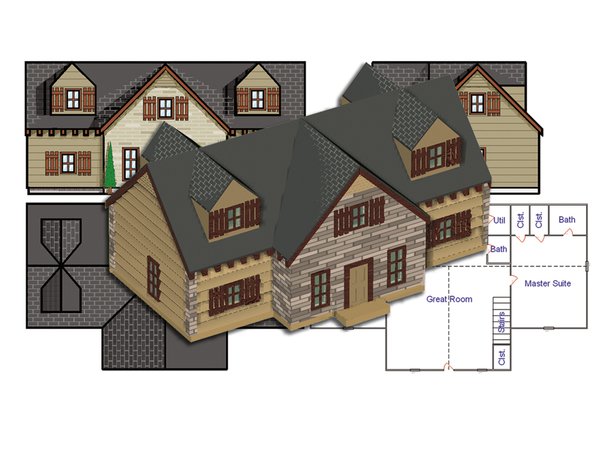
Architectural Design Tools
Realistic Rendering
Intuitive User Interface
Online Help
Easy to Learn & Use 2D/3D Design
Design 2D drawings fast and easy, then create complex 3D shapes simply by extruding (pulling) them from your 2D shapes.
Powerful Drawing Compare Technology
Drawing Compare is an invaluable aid when working collaboratively on a project, or when picking up an older project and looking to see the status of updates. Use it to compare a design and an ‘As Built’ drawing to see where changes have been implemented.
Beautiful Rendering
Apply a variety of materials, textures, colors, hatch patterns, and light effects to create stunning images. Customize material textures to further enhance the realism.
Animations & Walkthroughs
Create animations and walkthroughs of your finished drawings.
Valuable Content
DesignCAD 3D MAX includes 600 colorful, texture-mapped 3D models for easier architectural design. In addition, over 10,000 2D/3D symbols are delivered with your DesignCAD software to quickly drag and drop into your design. Plus retrieve millions more mechanical and architectural symbols with a free, 3-Month subscription to CADsymbols.com®!
AutoCAD® DWG/DXF Compatible & More
Share files with built in file filters for dozens of popular CAD and graphic formats, including AutoCAD®. Import DWG, DXF, WMF, and HPGL files and many more formats for editing in DesignCAD. Just as easily export to DWG, DXF, RIB, VRML, WMF, WPG, PDF and more to share your work. Plus, access new print options and print to PDF.
Perfect For:
Architects
Engineers
Illustrators
Builders
Contractors
Hobbyists
Educators
Students
New Features
New Print Section Command
This new command allows you to specify a rectangular subsection of the drawing to be printed. Once the region is selected, the Print command opens, and only considers the area you chose when calculating overall size, scale, and other print features.
Enhanced Print to PDF
Printing multiple panels to PDF format now results in just one multipage PDF file.
New Double Line to Vector Command
This new command converts the selected double-line object(s) to normal vectors using the currently-active line style and line width. Note: This command differs from the similar command Double Line to Wide Line, which converts the selected double lines to wide lines of the same width as the original double lines.
Larger, more versatile Layer Options dialog box
New Layer Options dialog box has been redesigned to maximize the amount of layer information displayed.
Dialog box can be resized to show more layers and longer layer names
Unwanted columns can be hidden by right-clicking on the column headers
Right-clicking on the body of the layer list provides a context menu which exposes commands that were formerly presented as buttons
New capabilities have been added to the Layer Options dialog box, including:
Show Marked Layers
Hide Marked Layers
Lock Marked Layers
Unlock Marked Layers
Clear Marked Layer Colors
Clear Marked Layer Line styles
Clear All Layer names
The Save as Default button now saves the layer names along with the layer presets
New Coordinate bar field width option
This option lets you specify the width (in pixels) of the coordinate bar’s numeric fields. This can be handy when you want to display more digits, are displaying coordinates in feet and fractional inches, or are using a large display font. The minimum value is 48 pixels, while the maximum will vary depending on the width of your display.
New Layers List additional width
This option lets you specify how much extra width (in pixels) to add to the layer drop list in the Info box and Layer Toolbox relative to the width of the collapsed layer control. Increasing this width allows you to see longer layer names.
Improved Hatch, Hatch Line, Hatch Fill
A new “Same As” button in the Hatch dialog box allows you to easily match the style of the hatch being drawn to an existing hatch entity.
Improved Import and Export
The “Missing Xref” warning dialog now offers options to skip some or all missing xrefs when importing dwg files. We’ve also improved the export of paperspace layouts to dwg format. In addition, DWG/DXF export now exports layer names longer than 32 characters.
Improved Fillet command
A new, more robust algorithm has been implemented for filleting one arc against another. This should result in less ambiguity when filleting arcs where multiple solutions are possible.
Improved Linear Dimensions
We have reduced the gap between the arrow “tail” and the dimension text when the text and arrows are forced outside the extension lines. We have also added a snap point to the left-side arrowhead to enable repositioning the dimension line using that arrowhead from Point Select Mode.
Improved Section Trim, Section Cutoff and Section Cut by Line
The Section Trim, Section Cutoff, and Section Cut by Line commands now also affect hatch objects; hatch entities were previously ignored by these commands.
New File Wizard command
New options have been added to Ignore Shading Flags and Ignore View Data, just like they were already present in the Open dialog.
Improved Set View and Set View by Drawing Center Command
Several new controls have been added to make it easy to save, load and delete “cameras” with preset viewing angles.
Improved Repeat Last Command (F3) and Undo Command
DesignCAD now longer records the various Zoom commands in the F3 and Undo command buffers. This makes it easier to repeat drawing commands even if a zoom in or out was necessary to see more details. All Zoom commands can still be undone separately using Zoom Previous.
Improved Sweep Command
Previously, the original profile used to generate the sweep was left separate from the swept object, with the assumption that you might want to re-use it for some other purpose. Now, the profile becomes part of the swept solid. A new option has been added to retain a copy of the profile if you want to use that profile again.
Enhancements to many commands using “Selected only” checkboxes
The last state of several “Selected entities only” checkbox is now remembered, so the next time you run that command with something selected, the checkbox is checked or not depending on your last choice when something was selected. If nothing is selected, the setting is ignored.
Additional Enhancements
Improved Hidden Line - New option to change the dash scale for hidden lines in hidden line mode.
Improved Shading Command - Slight improvements to the anti-aliasing algorithm when using native Phong or Gouraud shading.
Improved Load Animation Template – New delete button allows you to delete an existing animation template from the drawing.
Improved Arrow and Dimension commands - New algorithm for drawing arrows with a line width results in an arrowhead that points where it should and ends in a sharp point.
Improved Dimension Arc - Improved appearance of the extension lines.
Improved Surface Intersection command - Previously this command only worked on grid objects. Now it also works on solids, including planes.
Plus, corrections have been made to bugs found in DWG/DXF export, animation export to AVI, fillet command, rotate command, view settings, coordinate bar, print preview, and gradient hatches.
System Requirements
Minimum:
Windows® XP, Vista or Windows 7
Pentium III class processor
Microsoft ® Windows XP 512 MB RAM, Microsoft ® Vista 1 GB RAM
110 MB of free hard disk space
256+ MB of swap space
Super VGA display 1024x768
High Color (16bit) graphics card
CD-ROM Drive
Mouse
Recommended:
2.0+ GHz Pentium 4 or better processor
2 GB RAM
1GB or more of free hard disk space on your primary system drive (C:)
3D Graphics accelerator card with TrueColor (32-bit) graphics capability
Wheel mouse
Internet Connection
Microsoft® Internet Explorer ™ installation required for Internet activation.
代码 Ü ß ß Ü
Ü ÜÜÛß ßÛÜÜ Ü
ÜßßÛÜ ÜÛß ÜÜßÛÛß ßÛÛßÜÜ ßÛÜ ÜÛßßÜ
Ü ÞÛÜß Ü ßß ÜÛÛß t h e c r a c k e r s o f ßÛÛÜ ßß Ü ßÜÛÝ Ü
ßÜ ÛÛÛÜ ß ÜÜÜß ÛÛÛ ÛÛÛ ßÜÜÜ ß ÜÛÛÛ Üß
ß ÜÜ ßßßÜßÛÛÛß ÛÛÛ ÜÜÜ ÜÜÜ ÜÜÜ ÜÜÜÜ ÜÜÜ ÛÛÛ ßÛÛÛßÜßßß ÜÜ ß
ÛÛÛ ßÛß ÛÛÛ ÜÛÛ²²ÛÛÜ ÜÛÛÛ²ÛÛÜ ÛÛÛÛ²ÛÛÜ ÞÛ²²ÛÛÛ²ÛÝ ÛÛÛ ßÛß ÛÛÛ
ÛÛÛ ß ÛÛÛ ÛÛ²ÛßßÛÛÛÝÛ²ÛÛßßÛÛ²ÛÞÛ²ÛßÛÛÛÝ ²²ÛÛßÛÛßß ÛÛÛ ß ÛÛÛ
ÛÛÛ ÛÛÛ ÞÛÛÛÝ Û²ÛÞÛÛÛÝ ÞÛÛ ÛÛÛÝ Û²Û ÞÛÛÝ ÛÛÛ ÛÛÛ
ÛÛÛÛÛ ÞÛ²Û ÞÛÛßÞÛÛÛ ÛÛÛÝÛÛÛ ÜÛÛÛÝÛÛ²ÛÜÜÜ ÛÛÛÛÛ
ÛÛÛ ÛÛÛÝ Û²ÛÝ ÞÛ² Þ²ÛÛÛ²Ûß ÞÛÛÛÛÛÛÝ ÛÛÛ
ÜÛÜÜÜÛÜ ÞÛÛÛ ÛÛÜÞÛÛÛ ÛÛÛÝÛÛÛßßÛÛÛ ²ÛÛ²ßßß ÜÛÜÜÜÛÜ
[rAD!s] ÛÛÛßß ßßÜ Û²ÛÝ ÞÛÛÝÛÛÛÝ Þ²Û Û²Û Û²ÛÝÞÛÛÛÝÜÜ Üßß ßßÛÛÛ
ÛÛß ÞÛ²ÛÛÜÛ²ÛÝÞÛ²ÛÛÜÛÛÛÝ ÛÛÛ ÞÛÛÛ Û²ÛÛÛ²ÛÜ ßÛÛ
²ÛÛÜ ßÛÛÛ²ÛÛß ßÛÛÛ²²Ûß ÞÛ²ÛÝ ÞÛ²ÝÞ²ÛÛ²ÛÛÛÛÝ Ü²Û²
ß²²Û ßßß ßßß ßßßßß ßßß ßßßßß Û²Ûß
²Ý Ü ßÛÝ ÞÛß Ü Þ²
ÞÝ Û ÛÝ p r e s e n t t h e 3 0 k - c o l l e c t i o n ÞÛ Û ÞÝ
² ² þßß ßßþ ² ²
ÞÝ ÛÝ IMSI DesignCAD 3D Max v22.1 *INCL.KEYMAKER* ÞÛ Þ
þ ÞÛ ÛÝ þ
ÛÝ ÞÛ
ÞÛ Cracked by....: KaiZer SoZe Release-Name..: CR-TMX01.ZIP ÛÝ
ÛÛ Supplied......: CORE Release-Date..: 2013/01/07 ÛÛ
ÛÛÝ Packaged......: Bergelmir Release-Type..: Util ÛÛ
Û²Ý Protection....: Serial OS............: Windows Þ²Û
ÞÛÛ Crack/SN......: Keymaker Language......: English ÛÛÝ
ÞÛÛÝ Rating........: [You decide!] Disks.........: 16 ÛÛÝ
ÞÛÛ ÛÛÝ
Û²Û Û²Û
ÛÛÛ ßÛÜ ÜßßßÜ ÜÛß ÛÛÛ
ÛÛÛÜ ßÜ ÜÛ²ßÜÜß ßÜÜß²ÛÜ Üß ÜÛÛÛ
þ ßÛ²ÛÜÜ ßßÜÜ Üßß ßÜ Üß ßßÜ ÜÜßß ÜÜÛ²Ûß þ
ßÜÜ ßßÛÛÛÛÛÜ ßÜ Þ ßÜÜ Üß ßÜ ÜÜß Üß ÜÛÛÛÛÛßß ÜÜß
ßßÛÜÜÜ ßÛ²ÛÛ Û ß ßßÛÜ ÜÛßß ß Û ÛÛ²Ûß ÜÜÜÛßß
Ü ßßÛÛß ßÛ þß Üßß Þ°² ²°Ý ßßÜ ßþ Ûß ßÛÛßß Ü
Üþ Ü Ü ÞÝ ±±Ý Þ±± ÞÝ Ü Ü þÜ
ÛÝ ß ²ÜÜß ßÜÜ ßÜÜ ²²Û Û²² ÜÜß Üßß ßÜܲ ß ÞÛ
Þ²ÛÜܱ ÜÜÜÛÛß ß Üܲ²ß ß²²ÜÜ ß ßÛÛÜÜÜ ±ÜÜÛ²Ý
ß²Û²ÛÛÛÛ²²Û ÜÛ²ß ß²ÛÜ Û²²ÛÛÛÛÛ²Û²ß
ßßßßß °Ûß ßÛ° ßßßßßßß
°Û ÜßßÜ ÜßßÜ Û
ÞÝ°²ß ÞÝ ÞÝ ß²°Þ
ßÜ Üß ßÜ Üß
ßß ßß
Üþ þÜ ÜÜß Üß²Ü
ܲßÜ ßÜÜ ÛÝ ß ²ÜÜß ßÜܲ ß ÞÛ Üßß ÜÜÜ Û
Û ÜÜÜ ßßÜ Þ²ÛÜܱ ÜÜÜÛÛß ßÛÛÜÜÜ ±ÜÜÛ²Ý ÞÝ Ü²° ßßÜÜ
ÜÜßß °²Ü ÞÝ ß²Û²ÛÛÛÛ²²Û Û²²ÛÛÛÛÛ²Û²ß ßÜ ß ß Ü ßÜ
Üß Ü ß ß Üß ßßßßß ßßßßßßß ßß²° Ûß ÞÛ
ÛÝ ßÛ °²ßß þß ²Ý
Þ² ßþ ..: DESCRiPTiON :.. ²Ý
Û² ²Û
Û² ²Û
² Unleash Your Imagination with DesignCAD 3D MAX ²Û
² ²Û
² DesignCAD 3D MAX is an easy-to-use, versatile CAD tool that's ²Û
² perfect for novice designers, but powerful enough to create high- ²Û
² quality 2D/3D designs, models and animations. The intuitive ²Û
² interface and extensive online help make it easy to design ²Û
² anything, from simple hobby projects to professional precision ²Û
² drawings. It's everything you need! ²Û
² ²Û
² http://imsidesign.com ²Û
Û² ²Û
Þ²ÝÜ ÜÞ²Ý
ß°ß ß°ß
þß ßþ
ßÜ ÜÜ Ü Ü ÜÜ Üß
ß Ü þ Üßß ß ß±ß ß±ß ß ßßÜ þ Ü ß
ÞÝ ß Ü Ü Ü Ü ß ÞÝ
ܲßÜ ßÜÜ ßþ Ü þß ßþ Ü þß ÜÜß Üß²Ü
Û ÜÜÜ ßßÜ Üßß ÜÜÜ Û
ÜÜßß °²Ü ÞÝ ÞÝ Ü²° ßßÜÜ
Üß Ü ß ß Üß ßÜ ß ß Ü ßÜ
ÛÝ ßÛ °²ßß ..: iNSTALL/REGiSTER NOTES :.. ßß²° Ûß ÞÛ
Þ² ßþ þß ²Ý
Û² ²Û
Û² ²Û
² Use our keymaker to register the application. Activate via phone. ²Û
² ²Û
Û² ²Û
Û² ²Û
Û² ²Û
Û² Thanks for choosing ²Û
Û² (C)hallenge (O)f (R)everse (E)ngineering! ²Û
Û² ²Û
Û² ²Û
ÞÛ² ²ÛÝ
ÞÛ² Üþ þÜ ÜÜß Ü߲ܲÛÝ
ßÜ ßÜÜ ÛÝ ß ²ÜÜß ßÜܲ ß ÞÛ Üßß ÜÜÜ
ÜÜÜ ßßÜ Þ²ÛÜܱ ÜÜÜÛÛß ßÛÛÜÜÜ ±ÜÜÛ²Ý ÞÝ Ü²° ßßÜÜ
ÜÜßß °²Ü ÞÝ ß²Û²ÛÛÛÛ²²Û Û²²ÛÛÛÛÛ²Û²ß ßÜ ß ß Ü ßÜ
Üß Ü ß ß Üß ßßßßß ßßßßßßß ßß²° Ûß ÞÛ
ÛÝ ßÛ °²ßß þß ²Ý
ÜÜ Ü ..: CORE NEWS AND iNFOS :.. Ü ÜÜ
ÜÛÛÛÛ ßÜ Üß ÛÛÛÛÜ
ÞÛÛ²ÛÛÝ ÞÝ ÞÝ ÞÛÛ²ÛÛÝ
ÛÛ²ÛÛÛ Û - not available - Û ÛÛÛ²ÛÛ
Þ²Û²ÛÝ Üß ßÜ ÞÛ²Û²Ý
Û²ÛÛ ÞÝ ÞÝ ÛÛ²Û
ÞÛ²Ý ßÜÜ ÜÜß Þ²ÛÝ
ÛÛÝ ßÜ Üß ÞÛÛ
ßÛ ÞÝ ÞÝ Ûß
² Üß ßÜ ²
ÜÛß ßÛÜ
Üßß ßßÜ
Üß ßÜ
ÜÛÝ ÞÛÜ
²ÛÝ ÛÛ²
ÞÛÛ ÞÛÝ
ÛÛ ÛÛ
ÛÛ ÛÛ
ÛÛ ÛÛ
²ÛÛ ÛÛ
ÞÛÛÝ þßÜ Üßþ ÞÛÝ
Û²ÛÜ ÞÝ ÞÝ ÜÛ²
ßÛÛÛÛÜÜ ÜÜÜÜÛß ßÛÜÜÜÜ ÜÜÛÛÛÛ
ÛÛÛÛ²ÛÛÛÛÛßß ßßÛÛÛÛÛ²ÛÛÛÛ
Þ²Û ßßß ßßß Û²Ý
ÞÛÝ ÞÛÝ
ÞÛÝ ÞÛÝ
Û² ²Û
ÞÛÝ ÞÛÝ
Û² ²Û
ÞÛÝ ÞÛÝ
Û² ²Û
ÛÝ ÛÛ
ÛÛ ÞÛÝ
ÞÛÝ ÞÛÝ
Þ²Ý Þ²Ý
ÛÛ Ü ßþ þß Ü ÛÛ
Þ²Ý þ ß ß þ Þ²Ý
ÛÛ ÜÛßßÜÜ Ü ß ß ß ß Ü ÜÜßßÛÜ ÛÛ
Þ²ÝÜßß ßÛÜ ß²ß ß²ß ÜÛß ßßÜÞ²Ý
ÛÛ ß ß ÛÛ
ÛÛÛ ÛÛÛ
²ÛÛ ÛÛ²
ÞÛÛÝ ÞÛÛÝ
²ÛÛ ÛÛ²
ÛÛ² ²ÛÛ
²ÛÛ Û²Û
ÛÛÛ ÛÛÛ
ÛÛÛ ÛÛÛ
ÛÛ ÛÛ
ÞÝ ÞÝ
Û ÜÜÜ ÜÜÜ Û
Û Üßß ßßÜ lAYOUt & hEADER bY. [rAD!s] Üßß ßßÜ Û
ßÜ ßÜ Û nfO UPdATED ON [2012/01/03] Û Üß Üß
ßßÜÜÜ ÜÜÜß Ü (c) C.O.R.E. 2 0 1 3 Ü ßÜÜÜ ÜÜÜßß
ßßßßß ßßßßß
ú CRC 17A1:012D
|


 发表于 2021-8-22 21:43:15
/thumb.jpg)

/thumb.jpg)
/thumb.jpg)
/thumb.jpg)